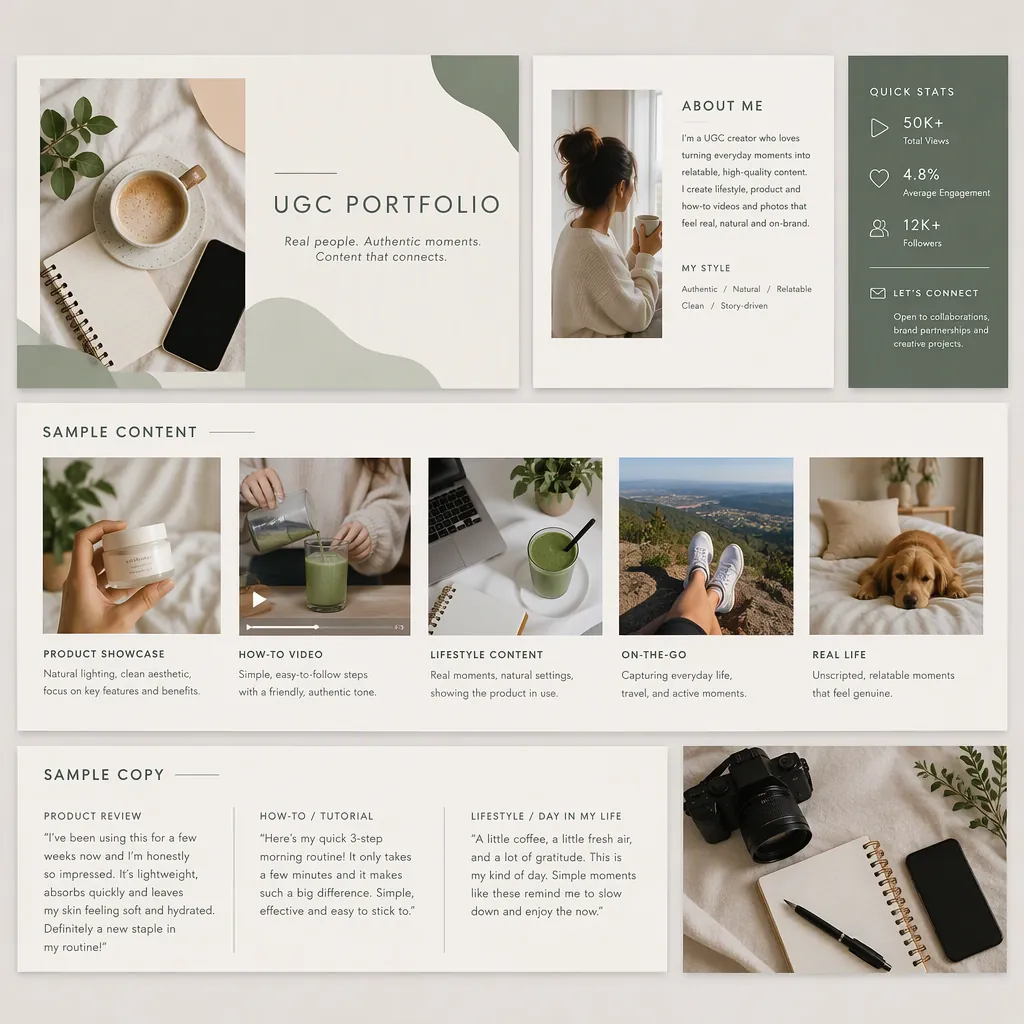
UGC Portfolio Template: A Practical Layout and Copy Guide
Use a UGC portfolio template with six parts: a short introduction, selected content samples, context for each sample, services, an optional process outline, and contact details. Put the work near the top and label self-directed samples clearly. This is a suggested structure, not a required industry format: the supplied portfolio collection describes varied approaches, including video-first layouts, prominent packages, and personality-led About pages. [c1]
Choose a Structure That Fits Your Work
For this template, a UGC portfolio means a page or document that presents a creator’s product-focused content samples and explains what they can produce.
The supplied Site Builder Report collection includes portfolios across beauty, lifestyle, food, fitness, and technology. It describes different presentation styles rather than one standard layout. [c1]
Use the following outline as an editorial starting point. Adapt it to the work you actually have rather than filling every section with unsupported credentials.
- Introduction: Your name, content focus, and relevant formats.
- Selected Work: A small, deliberate selection of videos or images.
- Sample Context: The purpose, your contribution, and whether the work was commissioned or self-directed.
- Services: Deliverables you are prepared to offer.
- Process: How you propose to handle a brief, production, and review.
- Contact: A verified contact method.
Packages and rates are optional. Include them only if they accurately reflect your current offer; do not borrow another creator’s prices or commitments.
Copy-Ready Portfolio Outline
# [Creator Name] — UGC Portfolio

## Introduction
I create [content formats] focused on [topics or product categories]. My work emphasizes [specific creative approach demonstrated in the samples below].

## Selected Work
[Insert selected samples with descriptive titles and captions.]

## Services
[Insert deliverables you can currently produce.]

## Proposed Process
[Describe briefing, production, review, and delivery steps you can support.]

## Contact
[Insert a verified email address as plain text or another current contact method.]
Write an Introduction You Can Support
Keep the opening focused on what someone can inspect in your portfolio. Name your formats and subject areas, then describe a creative approach visible in your samples.
Avoid claims such as “proven to increase sales” unless you have relevant, publishable evidence. An intended objective is not a measured result. You can describe a sample as designed to explain a product feature without claiming that it improved conversion.
If you are new to UGC work, you do not need to imply a client history. Introduce your current practice and let accurately labeled samples show your skills.
Introduction Copy Template
I’m [name], a creator focused on [topics]. I make [formats], with an emphasis on [demonstrable approach, such as step-by-step demonstrations or close-up product footage].

This portfolio includes [accurate description of commissioned work, self-directed samples, or both]. Each sample identifies its purpose and my role.
Give Each Sample Useful Context
Place selected work before a lengthy biography. The source collection notes that some portfolios open with videos, which offers one possible layout—not evidence that this arrangement performs better. [c1]
For each sample, add enough context to explain what the viewer is seeing:
- Format: Such as a vertical demonstration, still image, or voiceover video.
- Purpose: What the piece was intended to communicate.
- Role: Which parts you handled, such as scripting, filming, or editing.
- Status: Commissioned work, a self-directed concept, or another accurate description.
- Results: Optional; include only substantiated information you are permitted to publish.
As a publication precaution, check permission before sharing client materials, private briefs, testimonials, or performance data. A portfolio caption should not imply that a visible brand commissioned or endorsed a self-directed sample.
For a first portfolio, consider making several samples that demonstrate different skills. This is a suggested exercise, not a minimum sample count.
Reusable Sample Caption
### [Descriptive Sample Title]

Format: [Format and duration, if relevant]
Purpose: [Intended communication goal]
My role: [Work you personally completed]
Status: [Accurate project status]
Creative approach: [Observable choices in the sample]
Results: [Verified, publishable results, or remove this line]

For a self-directed sample involving a brand, use an accurate label such as: “Self-directed portfolio concept; not commissioned by the featured brand.”
Describe Services Without Overpromising
List concrete deliverables rather than vague promises. Distinguish the content you create from any proposed publishing, licensing, or account-access arrangements; do not leave those details implied by the word “UGC.”
If you include packages, specify what each includes and identify details that still require agreement. Treat the portfolio as an overview, not a substitute for a project-specific scope.
A process section can explain how you intend to work. If you have not established a repeatable workflow, label it “Proposed Process” rather than presenting it as a record of completed client engagements.
Service and Project Brief Template
## Services
- [Deliverable]: [Format, length, and quantity]
- [Deliverable]: [Format, length, and quantity]
- Optional additions: [Only additions you can provide]

## Details to Agree Before Production
- Content objective and intended audience
- Product information and required talking points
- Deliverable count, length, and aspect ratio
- Review stages and revision scope
- Delivery schedule and file requirements
- Where and how the content may be used
- Whether raw footage is included
- Whether publication on a creator account is included

## Proposed Process
1. Confirm the brief and scope.
2. Prepare the agreed concept or script.
3. Produce the agreed content.
4. Complete the agreed review stage.
5. Deliver the agreed files.
Check the Portfolio Before Publishing
Use this checklist as a practical review, not a guarantee of accessibility, legal compliance, or project inquiries.
- Replace every placeholder with accurate information or remove it.
- Check that each sample opens and plays on a phone and a desktop.
- Give samples descriptive titles and provide captions or transcripts where appropriate.
- Label self-directed work and describe your contribution accurately.
- Remove unsupported results, client names, logos, or testimonials.
- Check permissions for materials you plan to publish.
- Verify contact details and write any email address as plain text.
- Remove confidential information from screenshots and files.
- Confirm that listed services and availability are current.
Evidence limitation: The supplied collection is useful for observing portfolio layouts. It does not establish which template wins projects, how many samples are optimal, or what rates a creator should charge. The structure and copy above are original editorial suggestions, not a validated performance formula. [c1]
FAQ
Can I Make a UGC Portfolio Without Client Work?
You can use self-directed samples in this template. Label them clearly, explain your role, and avoid implying that a featured brand hired or endorsed you. Do not add fictional clients, testimonials, or results.
How Many Samples Should a UGC Portfolio Include?
There is no supported minimum in the supplied reference. As a practical starting point, choose a small selection that demonstrates distinct skills without repeating essentially the same example. Add work when it contributes something useful, not simply to increase the count. [c1]
Should I Put Rates in My UGC Portfolio?
Rates are optional in this template. The supplied collection describes some portfolios that feature rates and packages prominently, but it does not show that publishing rates leads to better outcomes. If you include prices, explain the deliverables and identify terms that require separate agreement. [c1]
Does a UGC Portfolio Have to Be a Website?
This outline can be adapted to a webpage, slide deck, or PDF. Choose a format that lets the recipient view your samples with enough context. For a static document, check that any linked videos are accessible to the intended viewer.