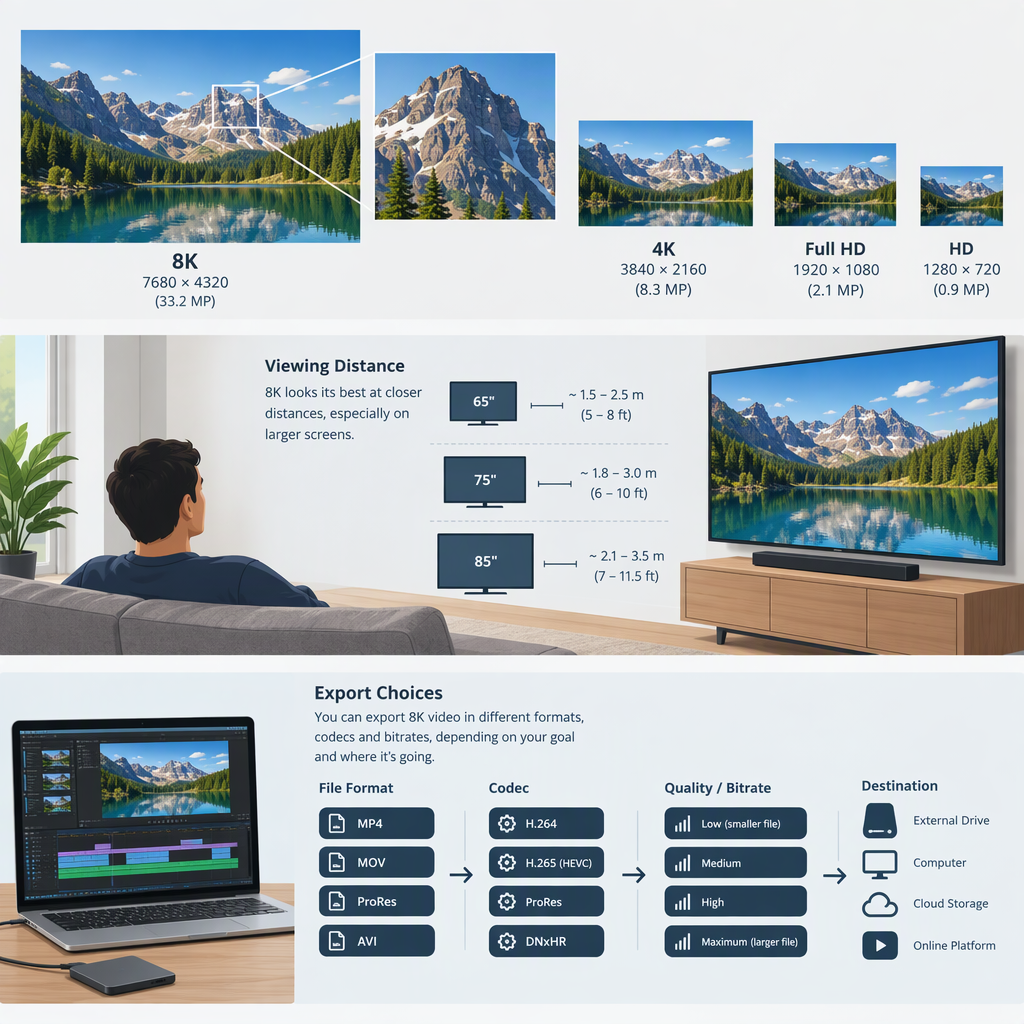
8K Video Explained: Resolution, Viewing and Export Choices
8K video usually refers to a frame with 7,680 × 4,320 pixels—about 33.2 million pixels. That is four times the pixel count of 4K UHD (3,840 × 2,160) and 16 times that of 1080p (1,920 × 1,080). The label describes resolution, not a guarantee that a video will look better: the source, encoding, playback path, display, and viewing conditions matter too. (itu.int)
For viewers, the practical question is whether the specific video and playback setup support 8K. For creators, it is whether 8K serves the intended delivery or editing workflow. There is no universal device, connection, or export setting that applies to every video service and publishing destination.
What Does “8K” Mean?
In the ITU’s UHDTV terminology, 8K is a progressive image format of 7,680 × 4,320. The same recommendations describe other image-system parameters as well, so resolution is only one part of a video format. Frame rate, color characteristics, and how a video is encoded are separate considerations. (itu.int)
A higher pixel count can preserve more image detail when the video is captured, delivered, and displayed in a way that makes use of it. But the number alone doesn’t tell you whether the image is well-focused, how it was compressed, or whether your screen can show the 8K source at its full resolution. Treat “8K” as a resolution label, not an overall quality score.
If You Want to Watch 8K Video
Check the complete playback chain for the specific video you want to watch:
- Source: Does the service or file actually offer an 8K version? A screen’s 8K capability cannot add detail to a lower-resolution source.
- Playback device and software: Does the device, app, or browser support that source’s playback format? Requirements can vary by service and device.
- Display: Can the display show the source at 8K, rather than scaling it to a lower resolution?
- Selected playback quality: If the service offers a quality menu, check what resolution is currently selected. For example, YouTube provides manual video-quality controls, but the available options depend on the video and playback setup. (support.google.com)
- Connection: If playback buffers or drops in quality, check the service’s guidance for that specific resolution and service. Don’t assume a speed figure published for 4K applies to 8K.
Decision rule: If any link in the chain does not support 8K, choose the highest resolution that works reliably. An 8K label on a display does not establish that every video will be available or play in 8K.
If You Create or Export Video
Choose resolution from the intended output backward: identify where the video will be delivered, check that destination’s current requirements, then decide whether an 8K source or export is useful for that workflow. A 4K or HD delivery may be the more practical choice when it meets the destination’s needs; exporting at 8K does not, by itself, improve a lower-resolution source.
One possible reason to capture in 8K is editing flexibility. An ITU report describes workflows using a single 8K camera source to produce multiple HDTV shots, including interactive zooming and panning. That is a use case—not a guarantee that every 8K recording can be cropped freely without consequences. (itu.int)
Higher-resolution files can also require more storage and processing, but the actual burden depends on the codec, frame rate, bitrate, duration, and workflow. For example, YouTube’s published upload-encoding table lists 8K SDR recommendations of 80–160 Mbps at standard frame rates (24, 25, or 30 fps), and higher ranges for high-frame-rate video. That page says its features apply to partners using YouTube Studio Content Manager, so don’t treat those figures as a universal export prescription or assume they apply to every upload path. Check the requirements for your own destination and workflow. (support.google.com)
Quick Decision Checklist
- Watching: Is the specific source offered in 8K? Can the playback device, software, and display handle it? Is 8K selected in the player?
- Creating: Does the destination accept the format and resolution you plan to deliver? Will 8K help with a real need, such as reframing, or is a lower-resolution output sufficient?
- Quality: Are you evaluating resolution separately from source detail, frame rate, color, and encoding?
- Practicality: Have you checked the storage, processing, and playback demands for your actual settings—not assumed that “8K” specifies them?
Bottom line: 8K means a very high-resolution image format, not automatic image quality or guaranteed compatibility. Choose it when the video source, workflow, and destination can make use of it; otherwise, a lower resolution may be the more suitable choice.