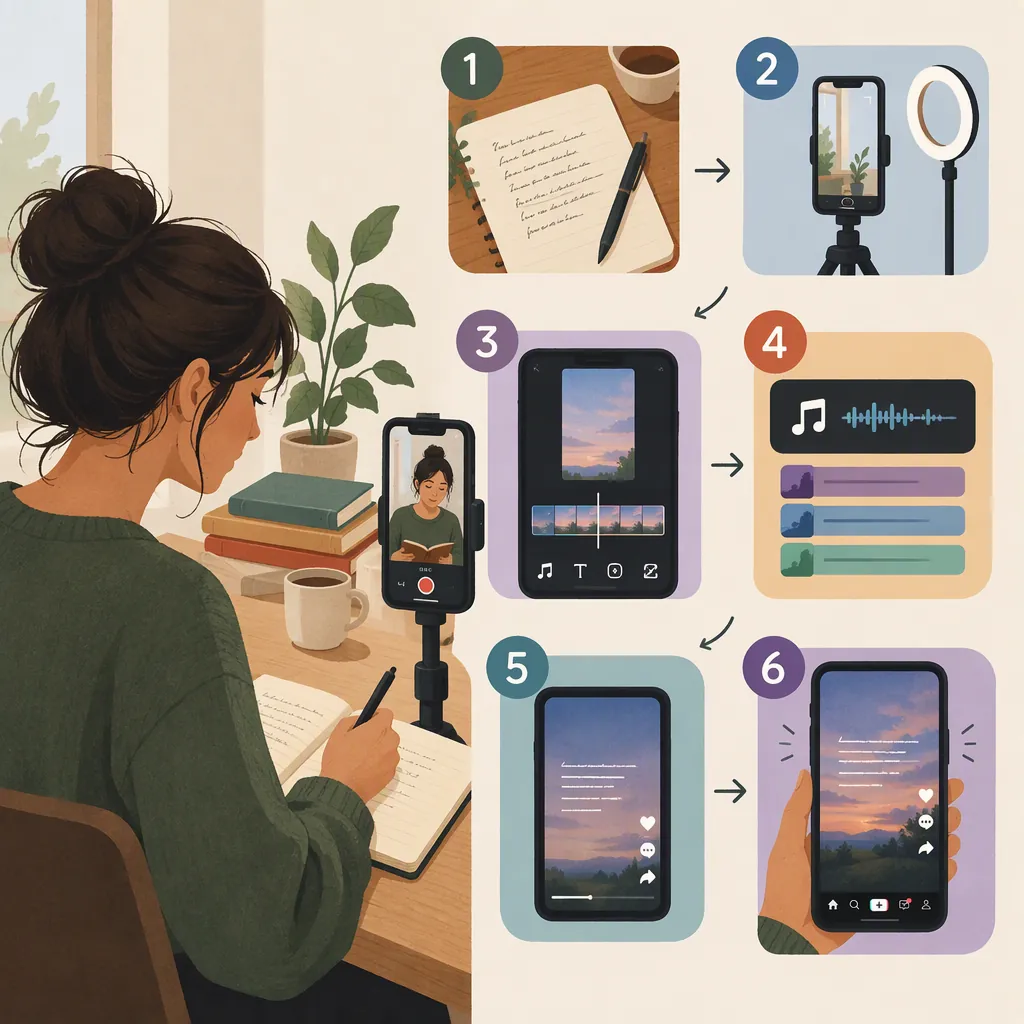
How to Make a Poetry Video on TikTok
To make a poetry video for TikTok, choose a poem or a clearly labeled excerpt, record a natural reading, and pair it with a simple vertical video. Add readable text, time it to your delivery, and keep any background music below your voice. Preview the result with and without sound before uploading. Treat this as a creative workflow, not a formula for views.
Choose a Poem and a Visual Format
Start with a poem you wrote, or material you have permission to use. If you select an excerpt, label it as an excerpt rather than presenting it as the complete poem. Attribution should accompany someone else's work; do not treat attribution alone as permission.
Choose one presentation approach:
- On-camera reading: Keep the frame simple and let your delivery carry the poem.
- Voiceover with footage: Pair your reading with a still scene, a small action, or imagery connected to the poem.
- Text-led video: Present the poem in readable passages, with optional narration.
Grace Bialecki's essay in The Millions describes both a filmed book reading and poets speaking to the camera without accompanying text. These are examples from a personal, critical essay—not evidence that one format performs better than another. [c1]
For a first attempt, choose the format that requires the least setup. Avoid forcing a complex poem into a short video solely to make it feel faster.
One-Video Planning Brief
Poem title:
Author and permission status:
Full poem or labeled excerpt:
Presentation format:
Central image or feeling:
Visual setting:
Text treatment:
Reason for each major creative choice:
Rehearse and Record the Reading
Read the poem aloud before filming. Mark breaths, deliberate pauses, and words that need emphasis. Decide whether each line break calls for a pause; do not automatically stop at every line ending.
Use the rehearsal to choose the video's length. Aim for a complete reading at a comfortable pace rather than a predetermined duration. If the reading feels too long, select a coherent excerpt instead of rushing every line.
For a simple recording setup:
- Choose a quiet space and silence nearby distractions.
- Place the phone or camera on a stable support in a vertical orientation.
- Record a short test and listen for unclear words, room noise, and distortion.
- Record another take, changing only what needs improvement.
If you plan to use voiceover, record the reading first and build the visuals around its timing. Keep a version of the voice recording without music so you can revise the mix later.
Reading Rehearsal Checklist
- Mark breaths and intentional pauses.
- Check that the opening is audible and understandable.
- Listen for rushed phrases and swallowed endings.
- Decide which line breaks need silence.
- Leave space after the final line.
- Select a take for clarity and expression, not speed alone.
Edit the Visuals, Text, and Sound
Use a video editor you can operate comfortably. Trim accidental starts and stops, but preserve pauses that contribute to the poem.
Build text around meaningful phrases or stanzas. Preserve intentional punctuation and line breaks where practical. If a line cannot fit legibly, reconsider the layout rather than shrinking the entire poem onto one screen.
Use contrasting text and a restrained background. Keep important words away from the frame edges, then check their placement in the TikTok preview before publishing. Hold each passage long enough for you to read it comfortably without sound.
If you include narration, review any generated captions against the poem word for word. Distinguish spoken-word captions from a visual layout designed to preserve poetic line breaks.
Music is optional. If you use it, choose audio you are authorized to use and lower it until every spoken word remains clear. Avoid cuts or effects that compete with a line you want the viewer to notice.
Line-By-Line Editing Worksheet
| Poem Passage | Voice Start | Voice End | On-Screen Text | Visual | Revision Needed |
| --- | --- | --- | --- | --- | --- |
| Opening | Enter timing | Enter timing | Enter exact wording | Describe shot | Check readability |
| Middle | Enter timing | Enter timing | Enter exact wording | Describe shot | Check pacing |
| Ending | Enter timing | Enter timing | Enter exact wording | Describe shot | Check final pause |
Preview the Video Before Publishing
Save the finished video and open it in TikTok's posting workflow. This guide does not verify current button names, upload limits, or feature availability; use the controls shown in your version of the app.
Review the posting preview rather than relying only on the editor preview:
- With sound: Can you understand every word without straining?
- Without sound: Can you read the text before it changes?
- In the posting preview: Is any important text covered or cut off?
- Against the poem: Are spelling, punctuation, attribution, and excerpt labels correct?
Write a description that identifies the poem and author where relevant. Add brief context if the video needs it, but do not replace an unclear edit with a long explanation. Review the audience and interaction settings before publishing.
Keep your original poem, recording, and editable project separately so future revisions do not depend on the posted copy.
Post Description Template
“[Poem title]” by [author].
[Full poem or excerpt.]
[Optional one-sentence context.]
[Credit for any permitted third-party visuals or audio, as applicable.]
Revise with Intention, Not a View Formula
After making the first version, ask what each creative choice contributes. Does the image deepen the poem or merely decorate it? Does the pacing support the language? Are the words still the focus?
Bialecki describes a teaching approach that asks writers to explain decisions about punctuation, repetition, and form. You can apply that revision principle to video choices as well. [c1]
Change one element at a time—for example, text size, a distracting shot, or an overly loud soundtrack. Compare versions for clarity and artistic fit rather than assuming that a particular length, aesthetic, or posting schedule guarantees reach.
Evidence limitation: The provided source is a 2023 personal essay about poetry on TikTok. It supplies cultural context and observations about craft, not current platform documentation or a controlled comparison of video techniques. The production steps here are suggested practices, not verified performance claims.
Revision Questions
What should the viewer notice first?
Which pause is essential?
Which visual choice has a clear purpose?
Where does the text become difficult to read?
What can be removed without weakening the poem?
Does the final version preserve the poem's intended meaning?
FAQ
Do I Need to Show My Face in a Poetry Video?
No. As a creative option, use a voiceover with simple footage or make a text-led video. Choose a format that serves the poem and feels manageable to produce.
How Long Should a TikTok Poetry Video Be?
Start with the time needed for a clear, unhurried reading. If the full poem does not suit the video you want to make, choose and label a coherent excerpt. The provided source does not establish an optimal duration, and this guide does not verify TikTok's current upload limits.
Should I Add Background Music?
Music is optional. Try the reading without it first. If you add music, use audio you are authorized to use and keep it low enough that the words remain clear.
Should On-Screen Text Preserve the Poem's Line Breaks?
Preserve intentional line breaks where the layout allows, but avoid making text too small to read. You can show the poem in separate passages and use spoken-word captions alongside a more deliberate poetic layout.