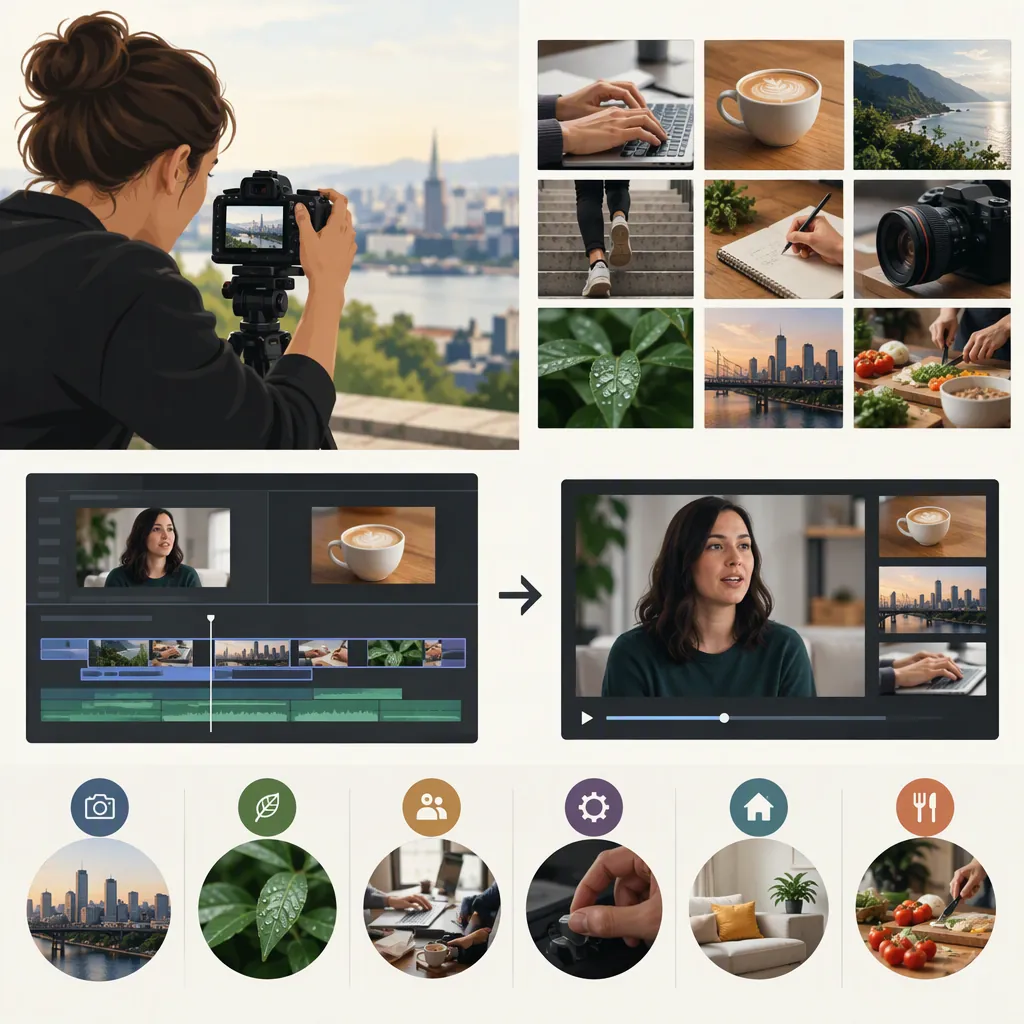
B-Roll Examples: What to Film and How to Use It
B-roll is supplementary footage that supports the main footage, or A-roll. Examples include a location exterior, hands performing a task, close-ups of tools, product details, and behind-the-scenes preparation. Choose shots that illustrate what the speaker or narration is discussing, rather than adding unrelated movement. B-roll can also accompany text in a standalone social video. [c2]
What Makes a Shot B-Roll?
B-roll describes a shot’s supporting role, not a particular camera, subject, or visual style. In the conventional arrangement, the main footage carries the story while supplementary footage provides context and visual interest. The supplied Stratos article also describes social videos that use B-roll as the visual content on its own. [c2]
For an illustrative example, imagine an interview about repairing a bicycle. The interview is the A-roll; shots of the bicycle, the tools, and the repair process are B-roll. In a step-by-step demonstration, however, the repair footage might be the main footage itself.
A useful planning question is: What does this shot help the viewer understand? If you cannot answer that, consider leaving it out.
Shot Purpose Prompt
Complete this sentence before filming: “While the audience hears or reads ___, this shot will show ___ so they can understand ___.”
B-Roll Examples by Story Type
The following are illustrative shot ideas, not descriptions of completed productions. They build on the supplied reference’s examples of locations, workspaces, tools, preparation, and processes. [c2]
| Story | Supporting Shots to Try | What the Shots Explain |
|---|---|---|
| Interview about a craft | Wide view of the workspace; hands using a tool; close-up of the finished piece | Where the work happens and what it involves |
| Cooking tutorial | Ingredients laid out; chopping from the side; a close-up of the mixture; the plated result | Preparation, individual steps, and the outcome |
| Workspace tour | Doorway view; desk setup; close-ups of frequently used tools | The layout and the details mentioned in narration |
| Object demonstration | Full view of the object; a specific control or feature; hands demonstrating its use | Appearance, operation, and scale |
| Behind-the-scenes video | Materials being arranged; equipment being prepared; cleanup | Work that happens outside the main presentation |
| Daily routine | Opening a notebook; preparing a drink; setting up a work area | The sequence of activities described in text or voiceover |
Choose specific actions over interchangeable scenery. For a line about organizing tools, show tools being sorted—not an unrelated view of the room. Avoid using an illustrative or staged shot in a way that implies it documents an actual event.
Five-Shot Workspace Exercise
Film these proposed shots: 1. A wide view of the workspace. 2. A person preparing the work area. 3. A close-up of an essential tool. 4. The tool being used. 5. The completed task or finished setup. Give each shot a purpose before recording it.
How to Shoot a Usable B-Roll Sequence
Start with one action that matters to your story. For example, if your narration explains preparing a workspace, film that preparation rather than collecting unrelated desk details.
As a practical exercise, capture the action in three ways:
- Wide: Show the surroundings and where the action happens.
- Medium: Show the person or hands performing the task.
- Close-up: Show the detail the audience needs to notice.
The supplied filming advice recommends recording multiple angles, stabilizing the phone with a tripod or stable surface, cleaning the lens, and controlling focus and exposure. [c2] Phone controls differ, so check how your camera app locks focus and exposure rather than assuming a single tap does it.
For this exercise, begin recording before the action starts and continue briefly after it ends. Review each take for focus, distracting reflections, and unwanted private information. If repeating an action, check whether object positions and the stage of the task still match.
Reusable B-Roll Shot List
| Shot | Story Purpose | Framing | Action | Review Check |
| --- | --- | --- | --- | --- |
| 1 | Establish the setting | Wide | Show the workspace | No private details visible |
| 2 | Explain the task | Medium | Prepare the materials | Action is clear |
| 3 | Reveal the key detail | Close-up | Use the relevant tool | Detail is in focus |
| 4 | Show the outcome | Medium or close-up | Display the completed task | Outcome matches the narration |
How to Use B-Roll in the Edit
B-roll’s supporting purpose is to add context and visual interest to the main footage. [c2] A practical editing approach is to start with the spoken explanation or text, then place each supporting shot beside the idea it illustrates.
For an illustrative workspace sequence:
- “I prepare the materials first.” Show materials being laid out.
- “This tool handles the detailed work.” Show the relevant tool in use.
- “Here is the completed result.” Show the finished task.
Let the important action remain visible long enough to understand it. Return to the speaker when their expression or explanation matters more than the supporting image. If a shot is decorative, use it sparingly rather than letting it replace a necessary explanation.
Before finishing, watch once without sound to check whether the visual sequence makes sense. Then listen while watching to check that the images do not contradict the words.
Narration-To-Shot Edit Worksheet
Narration or on-screen text: ___
Supporting shot: ___
Detail the viewer should notice: ___
Moment to enter the shot: ___
Moment to leave the shot: ___
Does the shot accurately match the statement? ___
When to Film Your Own Footage or Consider Stock
Consider filming your own footage when the story depends on a particular person, place, object, or process. Generic stock footage may be useful for an illustrative setting, but do not present it as documentation of a specific event it does not depict.
StudioBinder’s resource lists sources of free and paid B-roll and cautions readers to verify whether the particular clip is free. It also identifies frame rate, color treatment, and subject matter as factors in choosing footage. [c1]
That directory is a starting point, not permission to use an individual asset. Check the clip’s current license, attribution requirements, and permitted uses at its source. The supplied article does not establish current rights for any particular download.
Stock Clip Selection Check
Before including a stock clip, record its source, asset identifier, license terms, attribution requirements, and intended use. Check its subject, framing, frame rate, and color against your own footage. Confirm that its placement will not falsely imply a specific person, location, or event.
FAQ
What Is the Difference Between A-Roll and B-Roll?
A-roll is the main footage; B-roll is supplementary footage used alongside it. For example, an interview can carry the main explanation while shots of the discussed workspace provide supporting context. [c2]
Can I Film B-Roll with a Phone?
Yes. The supplied reference offers phone-specific B-roll advice: clean the lens, stabilize the camera, control focus and exposure, use natural light, and capture multiple angles. Check your phone’s controls before filming. [c2]
Can B-Roll Be Used Without an Interview?
Yes. The supplied reference describes standalone social videos built from B-roll and text prompts. An interview is not required; for your own sequence, pair the images with text or narration that gives them a clear purpose. [c2]
Does Free B-Roll Mean I Can Use It Anywhere?
Do not assume that it does. The supplied stock-footage directory describes differing licensing and attribution conditions and advises checking the selected clip. Verify the current asset-level terms before using it; the directory alone does not establish permission. [c1]