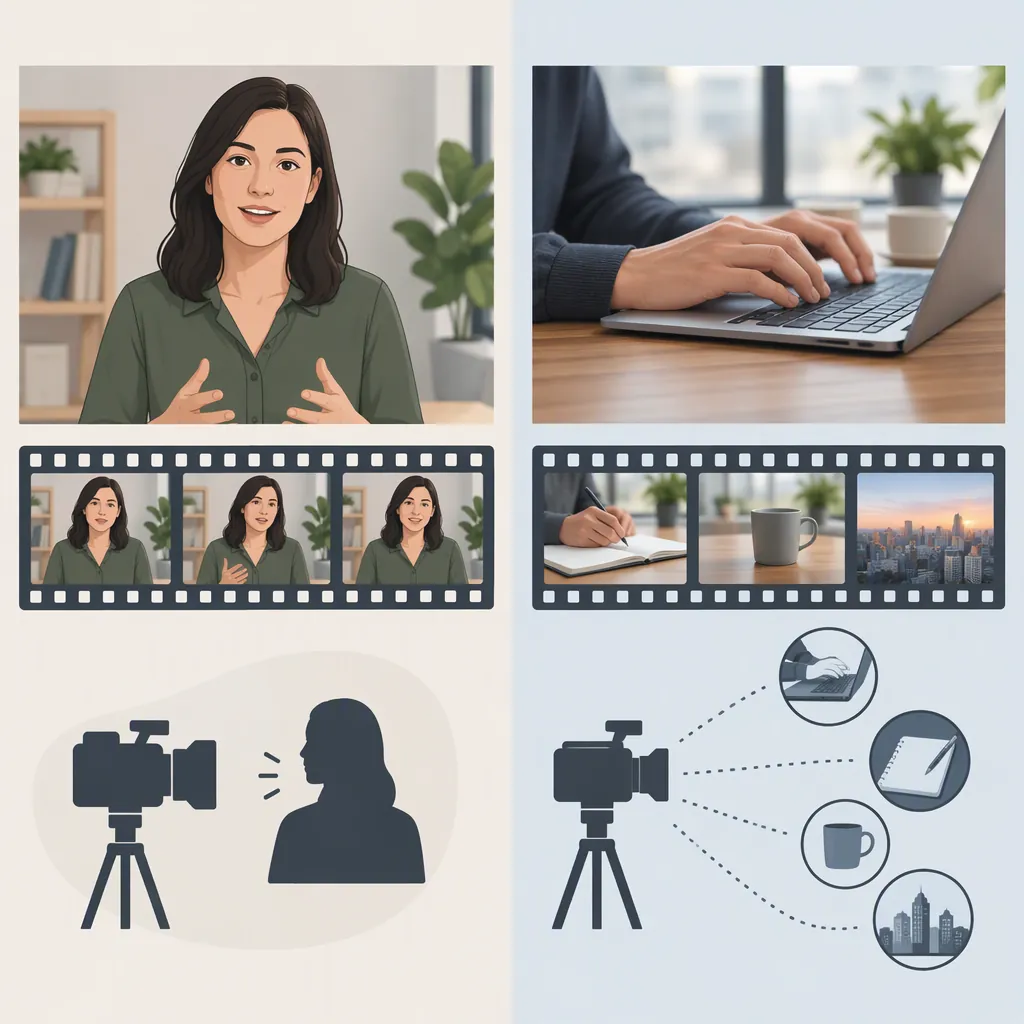
A-Roll and B-Roll Examples: What Each Shot Does
A-roll is the primary footage that carries a video’s story, such as an interview or presenter’s explanation. B-roll is supporting footage that illustrates that story, establishes a location, or covers a visual edit. For example, a baker explaining a recipe is A-roll; close-ups of kneading dough shown during that explanation are B-roll. The distinction is the footage’s role in the finished video. [c1] [c2]
A-Roll Vs. B-Roll at a Glance
A useful starting point is A-roll tells the story; B-roll helps show it. This shorthand fits interviews and presenter-led videos particularly well. In scripted scenes, A-roll can instead be the main action or dialogue, while B-roll supplies supporting views. [c1] [c3]
| Comparison | A-Roll | B-Roll |
|---|---|---|
| Main role | Carries the central narrative or action | Supports, illustrates, or adds context to it |
| Interview example | The interviewee answering a question | The interviewee working, relevant objects, or the location |
| Presenter-led tutorial example | The presenter explaining the process | A screen recording or detail shot illustrating the explanation |
| Use in an edit | Provides the main story sequence | Can appear between main shots or over continuing narration |
These are roles, not quality rankings. B-roll is supplemental, but it can communicate important details that the primary footage does not show. [c1] [c2]
Five Paired A-Roll and B-Roll Examples
The following are hypothetical production examples, not descriptions of actual shoots. They apply the primary-versus-supporting distinction used in the sources. [c1] [c2] [c3]
| Video Scenario | A-Roll Example | B-Roll Example | What the B-Roll Adds |
|---|---|---|---|
| Baker interview | A baker explains how they prepare dough | Close-ups of hands kneading and dough resting | Illustrates the process being discussed |
| Software tutorial | A presenter explains how to change a setting | A screen recording showing the menu and selection | Makes the described steps visible |
| Neighborhood news story | A reporter explains a road closure | Views of the closure signs and affected street | Shows the location and relevant conditions |
| Documentary about a musician | The musician discusses rehearsal | Footage of rehearsal and an instrument detail | Adds context to the interview |
| Scripted café scene | Two characters have a conversation at a table | An exterior view of the café before the conversation | Establishes where the scene takes place |
Notice that B-roll is not limited to landscapes or decorative shots. It can show work, objects, screen activity, or a setting—provided those images support the main story. [c1]
How A-Roll and B-Roll Work Together in an Edit
In an interview edit, the speaker’s audio can continue while the picture changes to B-roll. That lets the viewer hear the explanation and see its subject at the same time. A supporting shot can also cover the visual jump between selected interview excerpts. [c2] [c3]
The sample below is an original, hypothetical editing exercise. Its timings are illustrative, not a required formula. The spoken line is invented for the exercise.
Sample Baker Interview Edit
| Timeline | Picture | Audio | Role |
|---|---|---|---|
| 0–4 seconds | Baker speaking to camera | “I begin by mixing the dough.” | A-roll introduces the process |
| 4–8 seconds | Close-up of mixing | The baker’s explanation continues | B-roll illustrates the explanation |
| 8–12 seconds | Hands kneading dough | The baker describes kneading | B-roll shows the relevant action |
| 12–16 seconds | Return to the baker | The baker introduces the next step | A-roll carries the narrative forward |

Practice: assemble the spoken explanation first, then place the supporting images over the relevant phrases. Check that each image matches what the viewer hears.
Why the Same Shot Can Have a Different Role
Do not label footage solely by its subject or camera angle. Boords notes that footage originally captured as primary material can later serve as B-roll in an edit. [c1]
For example, in a hypothetical presenter-led tutorial, a screen recording supports the presenter’s explanation and functions as B-roll. If the screen recording itself carries the entire demonstration, it is the primary footage instead. Likewise, hands kneading dough can illustrate an interview or become the central action in a visual recipe video.
A practical question is: Does this shot carry the main explanation or action, or does it support another piece of footage that does? This is a classification aid, not a rule that every video must follow.
Choose B-Roll That Supports the A-Roll
Start with the story or explanation, then identify images that make it more concrete. The sources recommend planning B-roll with a shot list and pairing supporting imagery with the main narrative. [c1] [c2] [c3]
For the hypothetical baker interview, useful choices would be:
- A process detail: mixing or kneading when the baker describes that step.
- A location view: the kitchen when the setting needs to be introduced.
- A relevant object: a tray or ingredient when it is mentioned.
An unrelated attractive shot may add visual variety without explaining the topic. Prefer a clear connection between the image and the narration. Also keep the distinction between illustration and evidence visible: a hypothetical example in this article explains an editing role; it does not document a real person or event.
FAQ
Is a Talking-Head Shot Always A-Roll?
A talking-head interview is a common A-roll example because it carries the narrative. But intended use matters: primary footage can later be used as supplemental material in another edit. Classify the shot by its role, not just by whether someone is on camera. [c1]
Can B-Roll Have Audio?
Yes. B-roll is not defined as silent footage. For example, Boords describes reenactment footage that can include dialogue. Another common arrangement is to show B-roll while the interview’s A-roll audio continues as voiceover. [c1] [c2]
Does Every Video Need Both A-Roll and B-Roll?
No. A project can communicate its story using A-roll alone. B-roll offers additional ways to illustrate the subject, establish a setting, and cover edits, but its usefulness depends on the video’s content and structure. [c1] [c3]