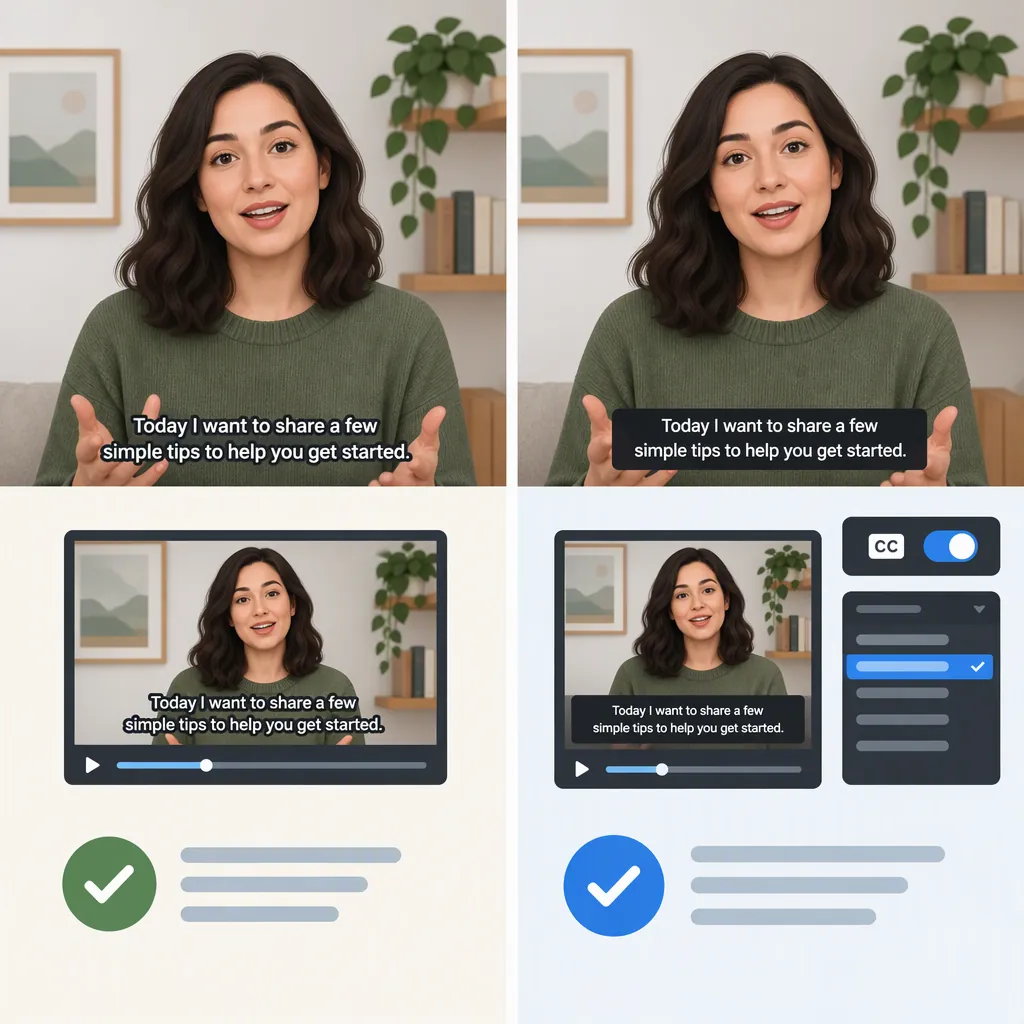
Burned-In Captions Vs. Closed Captions for Creator Videos
Burned-in captions are part of the video image and stay visible; closed captions can be turned on or off through a supporting player. Choose burned-in captions when text must appear without viewer action, and closed captions when viewer choice matters. Neither format guarantees accurate or complete captions: review the words, timing, speaker identification, and meaningful sound cues before publishing. [c1] [c2]
What Changes Between the Two Formats?
Burned-in captions, also called open or hard-coded captions, become part of the video’s visual content. Closed captions remain a text layer that viewers can enable or disable in a supporting player. Closed captions may be delivered within a media file or uploaded separately alongside the video. [c1]
| Decision Factor | Burned-In Captions | Closed Captions |
|---|---|---|
| Visibility | Always visible in the captioned video | Viewer can turn them on or off |
| Delivery | Text is rendered into the video image | Text is delivered through a supported caption track |
| Player Dependency | Visibility does not require a caption toggle | Display requires player support |
| Corrections | Correct the source text and export a new captioned video | Correct the caption asset and use the destination’s update process |
| Language Versions | Each burned-in language needs its own video version | Separate language tracks are an option where supported |
The visibility and delivery distinctions come from the references; the correction workflow follows from whether the text is part of the image or a separate asset. Exact upload, replacement, and language-selection options must be checked on the destination. [c1] [c2]
Choose Based on the Viewing Context
Consider burned-in captions when visibility is the priority. Examples include a clip intended to make sense without sound or a presentation where viewers cannot operate individual caption controls. The text appears without anyone enabling a setting. That convenience also removes the option to hide it. [c1]
Consider closed captions when viewer control is the priority. For a tutorial, interview, or longer creator video, optional text lets viewers choose whether to display captions. Separate tracks can also support different languages where the player allows them. [c1] [c2]
For multiple destinations, keep both delivery options available. A practical approach is to retain an uncaptioned video master and a reviewed timed caption file, then create the required exports. This is a workflow recommendation, not a claim that every platform accepts the same files or provides the same controls.
Separate Caption Delivery from Caption Content
“Open versus closed” describes how text is displayed. “Captions versus subtitles” describes what the text is intended to communicate. Subtitles generally focus on dialogue or translation; captions also convey meaningful audio information, such as speaker identification and relevant sound effects. Subtitles can also be burned into a video. [c2]
For example, spoken words alone may not explain that an off-screen phone is ringing or identify which unseen person is speaking. Include that information when it matters to understanding the scene. [c2]
Treat completeness and readability as separate checks from format selection. Always-visible text is not automatically sufficient, and an optional caption track is not automatically accurate. Review both formats against the audio and the intended viewing experience. The provided references do not establish legal compliance for a particular creator video.
Review Once, Then Test Each Export
Start with a transcript, correct the wording, and prepare timed cues. Add speaker labels and meaningful sound descriptions where needed. Automated transcription can provide a draft, but names, acronyms, overlapping speech, and timing still need review. [c2]
SRT is one possible timed-text format: its cues contain a sequence number, start and end timestamps, and text, separated by blank lines. The same reviewed text can be used for a supported closed-caption upload or rendered into a burned-in export. Do not assume SRT is accepted everywhere; match the export to the destination. [c1] [c2]
Use the following checklist as a suggested publishing review. Test the actual output rather than relying only on the editing preview.
Caption Export Review Checklist
- [ ] Check names, terminology, punctuation, and speaker changes against the audio.
- [ ] Include meaningful sound cues needed to understand the video.
- [ ] Confirm each cue appears with the corresponding speech or sound.
- [ ] Check line breaks, contrast, and readability at the intended viewing size.
- [ ] For burned-in exports, confirm text does not obscure essential visual information.
- [ ] For closed captions, confirm the uploaded track displays and the on/off control works.
- [ ] If both formats are present, enable the closed track and check for distracting duplicate text.
- [ ] Preview the delivered video on the intended device or player.
- [ ] Retain the reviewed caption file and an uncaptioned master for revisions.
What This Comparison Does Not Establish
This comparison draws on two explanatory articles published on captioning and transcription service websites. They support the basic format distinctions and general workflow guidance used here. They are not destination-specific technical documentation or a legal accessibility standard. [c1] [c2]
No universal platform-support claim, engagement improvement, search-ranking benefit, or compliance guarantee is made. Before delivery, verify the destination’s current accepted formats and caption controls, and test the resulting playback.
FAQ
Can Viewers Turn Off Burned-In Captions?
No. Burned-in captions are part of the video image. Turning off a player’s closed-caption setting does not remove them. Provide a separate version without burned-in text if viewers need that option. [c1]
Can the Same SRT File Be Used for Both Formats?
Yes, where the tools and destination support it. A prepared SRT file can be uploaded alongside a video for closed-caption delivery or used to render open captions into the video. Check the destination’s accepted format and review each output. [c1]
Are Dialogue-Only Subtitles Enough for Accessibility?
Not necessarily. Dialogue-only subtitles may omit speaker identification and meaningful non-speech sounds. Those details can be necessary to understand the video without hearing its soundtrack, regardless of whether the text is burned in or optional. [c2]