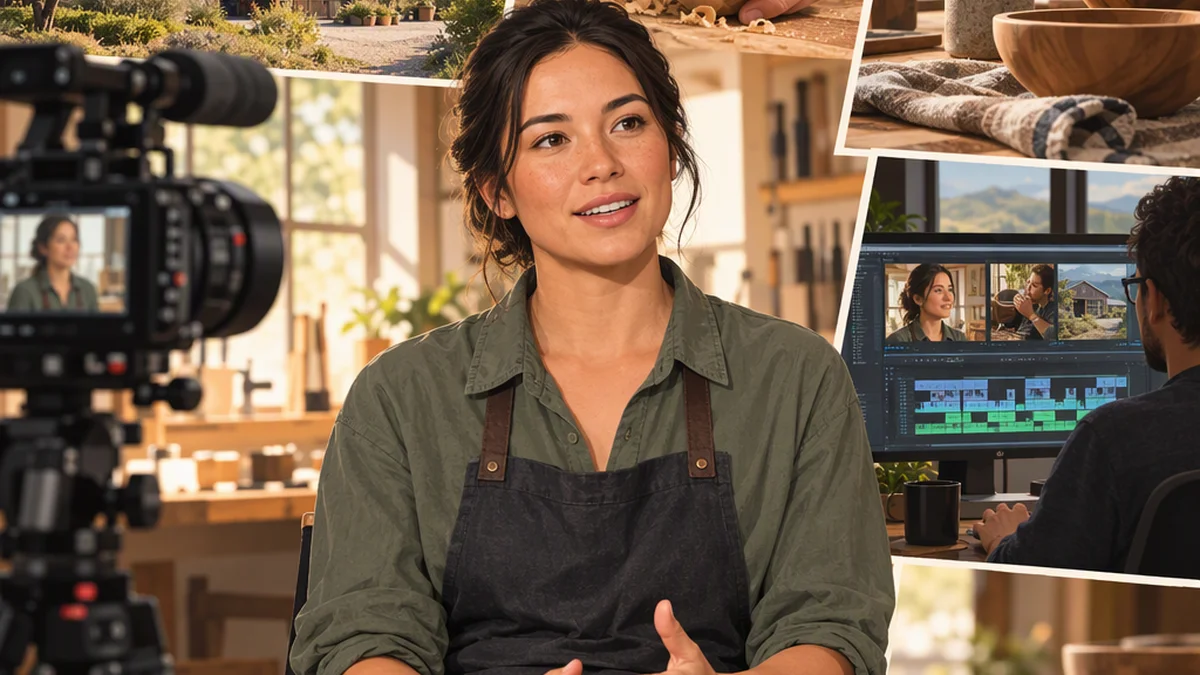
B-Roll Meaning and Use: A Practical Guide
B-roll is supplemental footage used alongside a video's main material, often called A-roll. A-roll usually carries the central action or spoken message, while B-roll shows related places, actions, details, or context. For example, in an interview with a baker, the interview is A-roll; footage of measuring flour, shaping dough, the shop exterior, and customers receiving bread is B-roll. Editors use it to illustrate points, orient viewers, and cover visual cuts when appropriate.
What Does B-Roll Mean?
B-roll, also written B roll, is secondary footage that supports the primary footage in a video. The primary footage is commonly called A-roll. In practical terms, A-roll often contains the main interview, the presenter speaking to camera, or the central action of a scene. B-roll gives the audience something relevant to see while that main material continues or between its shots.
For narrated or interview-led videos, a useful shorthand is: A-roll tells; B-roll shows. For example, if a narrator says that a mechanic inspected an engine, B-roll might show the garage, the mechanic’s hands, diagnostic tools, or a close-up of the engine component being discussed. These images can make the explanation more concrete without replacing the core narration.
The name comes from older film and videotape workflows that used separate A and B rolls or sources. Digital editing does not require physical rolls, but editors and production crews still use the term to describe supplemental material. B-roll can include location views, cutaways, close details, activity footage, archival visuals, licensed stock footage, animations, or screen recordings when those visuals serve the story.
What B-Roll Does in a Video
B-roll is not useful simply because it makes a video look busier. Its strongest purpose is to help viewers understand and follow the message. Before placing a shot into an edit, identify its job.
- Illustrate a statement. For example, if someone says, “We sort orders every morning,” footage of labels, shelves, hands sorting packages, and completed orders can show that process.
- Establish a place or situation. A wide exterior of a workshop, classroom, store, or worksite tells viewers where the following action happens.
- Add meaningful detail and atmosphere. A close-up of hands working, a relevant object, or environmental activity makes a location more specific.
- Provide editing flexibility. An interview may need pauses, repetitions, or unrelated remarks removed. Cutting directly between moments of a stationary talking-head shot can create a noticeable jump. A relevant B-roll clip placed over the cut can smooth the visual transition while the interview audio continues.
- Support pacing. Alternating between a speaker and clear supporting images can make a sequence easier to watch.
B-roll should not obscure an important facial expression, evidence, or explanation merely to create motion. A decorative shot that does not clarify, support, or intentionally pace the message is usually less useful than a simple, relevant shot.
Common Types of B-Roll Shots
A practical B-roll plan combines multiple shot sizes and purposes rather than relying on one category.
| Type | Purpose | Examples |
|---|---|---|
| Establishing shots | Introduce a location or situation | A building exterior, a wide view of a kitchen, a broad look at a worksite |
| Cutaways | Shift attention from the main action to something related | The interview room, an interviewer listening, an object relevant to the discussion |
| Insert shots | Highlight a specific detail | A calendar date, a tool setting, a hand writing a note, an ingredient measurement |
| Activity shots | Show a process, routine, skill, or event | Someone preparing equipment, sorting packages, or making coffee |
| Detail shots | Direct attention to meaningful features | Hands, tools, materials, documents, or textures |
| Atmosphere and transition shots | Establish mood or signal a change in time or location | Movement through a space, relevant weather, traffic, or a quiet moment between activities |
For instructional videos, explanatory visuals can act as B-roll too. A screen recording of the exact step being explained can serve as supplemental footage over a presenter’s narration.
These categories can overlap. A close-up of a tool setting, for instance, may be both an insert and a detail shot. What matters is how it supports the story.
How to Plan B-Roll Before Filming
Good B-roll begins with the story. Do not wait until the end of a shoot and capture random attractive images. Start with a script, an interview outline, or a list of the main points the video must communicate.
-
Mark what can be shown. Underline important nouns, actions, locations, and claims. For example, for the line, “The team prepares equipment before sunrise,” possible visuals include the location before daylight, equipment cases, hands checking settings, and the team beginning work.
-
Build a coverage list. For each key person, activity, or place, list a wide shot, a medium shot, and one or more close detail shots. The wide shot supplies context; the medium shot connects the person to the activity; the close shot emphasizes a specific detail.
-
Scout the location. Identify useful backgrounds, likely activity, access restrictions, distracting noise, and lighting conditions. A location scout can reveal that an important action occurs only at a certain time or in a room that cannot be filmed later.
-
Reserve time for supplemental footage. B-roll needs dedicated shooting time. If it is treated as an optional extra after the main interview, the production may miss the activity, light, or access needed for the most useful shots.
-
Check accuracy, permission, and context. If people, private spaces, archival material, or third-party footage are involved, verify appropriate permission and use. A visual should not imply that a person, location, or event is connected to a claim when it is not.
How to Shoot Usable B-Roll
Use the following steps to capture footage that is easier to edit.
-
Film each important action from multiple angles. For example, for someone making coffee, record a wide view of the kitchen, a medium shot of the person preparing the machine, and close-ups of measuring grounds, pouring water, and the finished cup. This gives the editor a sequence rather than disconnected clips.
-
Start early and end late. Begin recording before the visible action starts and continue briefly after it finishes. Those extra seconds, often called handles, make it easier to trim clips and place transitions cleanly.
-
Choose movement for a reason. A static shot is often clearest. Move the camera when movement reveals information: follow a subject entering a room, pan across a relevant document, or move from a workspace to the task detail. Unmotivated motion can distract from the subject.
-
Maintain continuity when it matters. Look for visible changes in clothing, lighting, weather, object placement, or screen content. Not every shot needs to match perfectly, but major mismatches can confuse viewers about timing or events.
-
Record ambient sound when practical. Even if the final sequence uses narration or interview audio, a short recording of the location’s ordinary sound can be useful in the sound mix.
-
Review essential clips before leaving. Confirm focus, framing, exposure, and that the full action was recorded. A visually appealing shot is not usable if the key detail is out of focus or outside the frame.
How to Use B-Roll in the Edit
Build the A-roll first. The interview, narration, or primary action should make sense as a story before B-roll is added. Then use supplemental footage where it has a defined purpose.
-
Match image to meaning. When a speaker mentions a place, show the actual place when possible. When they describe an action, show that action. This direct pairing helps viewers process the information.
-
Cover necessary visual cuts carefully. If an interview answer is shortened, place relevant B-roll over the visual jump. Do not rearrange audio in a way that changes the speaker’s meaning or makes separate remarks appear to be one continuous statement.
-
Change framing intentionally. Use a wide shot for orientation, a medium shot for activity, and a close-up for detail or emphasis. Avoid switching shots merely because a fixed interval has passed.
-
Keep key moments on screen. If an interview subject’s expression, demonstration, or exact wording is important, allow viewers to see it. B-roll should support the central material rather than conceal it.
-
Verify factual alignment. Images make claims as well as words do. Do not show a different building, person, product, or event in a way that suggests it is the one being discussed.
-
Review twice. Watch once with sound off to test whether the visual sequence is understandable. Then watch with sound on and check whether every B-roll shot reinforces the spoken message, provides needed context, or improves pacing.
Example: B-Roll for a Shop Interview
Imagine an interview subject says: “I open the shop early, prepare the display, and talk with regular customers throughout the morning.”
A useful edit might begin with the subject speaking, then cut to an exterior of the shop before opening. As the subject says “prepare the display,” show medium and close shots of arranging products. For “regular customers,” show a relevant interaction filmed with appropriate permission. Return to the interview when the person’s expression or direct explanation matters most.
The goal is not to hide a talking-head interview. The goal is to let viewers see the world and actions that the interview describes.
Before You Wrap the Shoot
Check that you have:
- A wide establishing view of each key location.
- Medium shots of important people and activities.
- Close detail shots tied to the story.
- Beginning, middle, and end coverage of major actions.
- Calm transition shots where useful.
- Usable focus, framing, and exposure.
- Ambient sound if needed.
- Appropriate permission and context for any people or third-party material shown.
FAQ
Is B-Roll the Same as Stock Footage?
No. Stock footage is one possible source of B-roll, but B-roll describes the footage’s role in the edit: it supplements the main footage. B-roll may be material filmed specifically for the project, archival footage, licensed stock clips, animations, screen recordings, or other relevant visuals.
Is a Close-Up Always B-Roll?
No. A close-up can be A-roll or B-roll. If it is part of the central scene or main action, it may be A-roll. If it is inserted to support another shot, interview, or narration point, it functions as B-roll. The role in the edit matters more than the shot size.
How Much B-Roll Is Enough?
There is no fixed ratio of B-roll to A-roll. Capture enough coverage to show the key places, actions, details, and transitions in the story. For an important activity, record more than one angle and shot size so the editor has options. Prioritize relevance and completeness over collecting unrelated footage.
Can B-Roll Have Sound?
Yes. B-roll can include natural sound, dialogue, or ambient sound. In many edits, its original sound is reduced or replaced by interview audio, narration, music, or a deliberate sound mix. Recording useful room tone can also help create smoother audio transitions.
Why Is B-Roll Especially Useful in Interviews?
Interviews often produce a stationary shot of one person speaking. B-roll can show the subject’s work, surroundings, relevant objects, or related events while their audio continues. It can also conceal visual jumps caused by removing pauses or shortening an answer, provided the edit does not alter the speaker’s meaning.