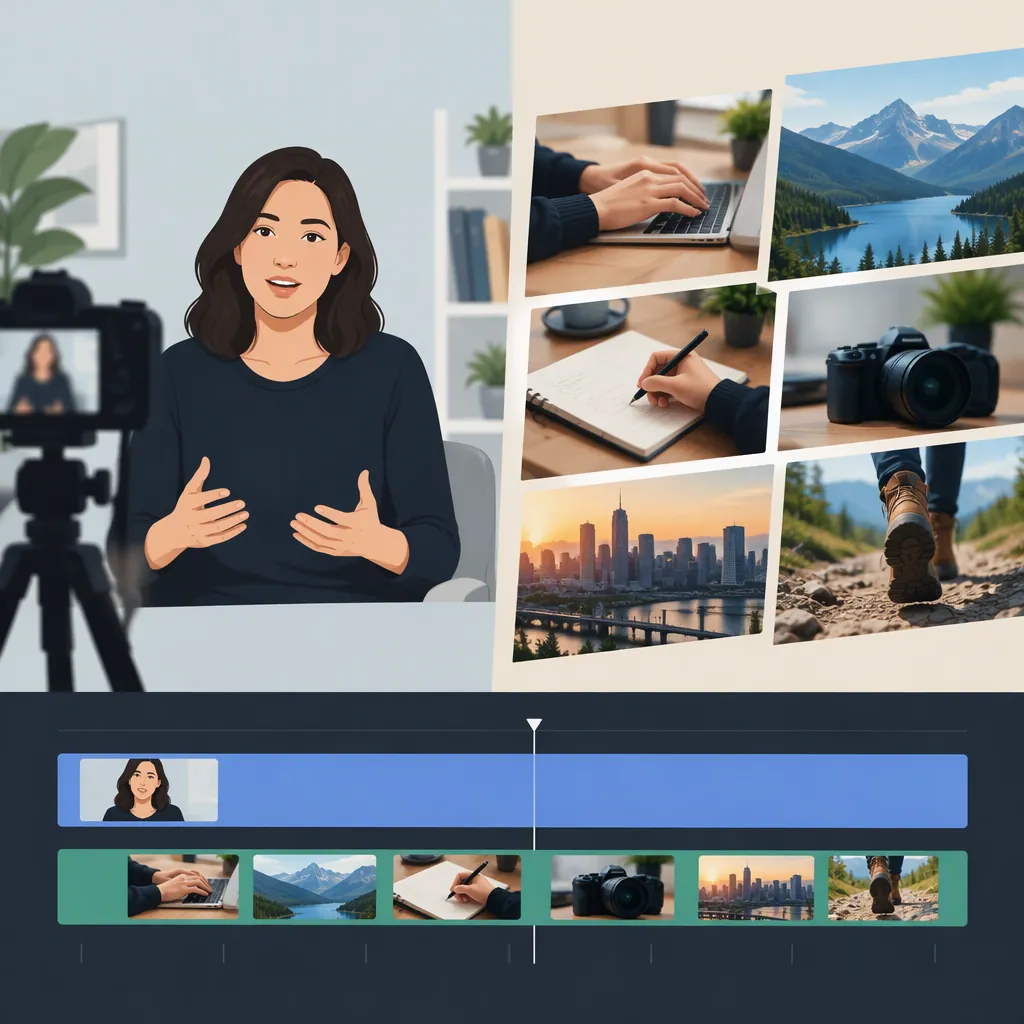
A-Roll Vs. B-Roll: What Each Adds to a Video
A-roll is the primary footage that carries a video's central story, such as an interview or a presenter explaining a topic. B-roll is supporting footage that adds context, shows details, or covers a visual edit while the main story continues. The difference is the footage's role in the finished video, not simply what it shows: primary footage can also be repurposed as B-roll. [c1] [c2]
The Main Differences Between A-Roll and B-Roll
A-roll and B-roll are complementary parts of a video, rather than competing approaches. A-roll delivers the central narrative; B-roll supports that narrative with additional visuals. Both Riverside and TechSmith describe this primary-versus-supporting distinction. [c1] [c2]
| Comparison | A-Roll | B-Roll |
|---|---|---|
| Main role | Carries the central message or action | Adds context, detail, atmosphere, or visual explanation |
| Common examples | An interview, presenter, or scene with key dialogue | A relevant close-up, location shot, screen recording, or archival image |
| Editing purpose | Provides the main narrative to organize the sequence around | Supplements that narrative and can conceal visible cuts |
| Relationship to the story | Presents the main account | Helps viewers see what the main account describes |
These are common roles, not rigid categories. TechSmith notes that a discarded take or part of the primary footage can become B-roll when reused to support the edit. A clip's subject alone therefore does not determine its label. [c2]
Examples That Make the Distinction Clear
The following illustrative pairings show how the two roles work together. They follow the cooking, interview, documentary, and screen-recording examples discussed in the supplied guides; they are not accounts of actual productions. [c1] [c2]
- Cooking video: The chef explaining the recipe is A-roll. Close-ups of chopping, ingredients, and food in the pan are B-roll.
- Interview: The interviewee's answer is A-roll. Footage showing the activity or place being discussed is B-roll.
- Software explanation: A presenter describing a website can be A-roll, with a screen recording serving as B-roll to illustrate the explanation.
- Documentary: An interview can provide A-roll, while historical photographs or footage provide supporting context.
B-roll does not have to be newly filmed moving footage. Epidemic Sound's definition includes still images, and both its guide and Riverside's guide discuss archival material as a source of supporting visuals. [c1] [c3]
When to Use Each in an Edit
Keep A-roll on screen when the speaker or central action is what the viewer needs to follow. Consider B-roll when a supporting visual can explain a detail, establish a setting, or show an action more clearly. The supplied guides describe B-roll as a way to reinforce narration, emphasize details, and break up extended talking-head footage. [c1] [c2]
B-roll can also cover a visible edit. For example, supporting footage can appear over a shortened interview passage while the interview remains the main narrative. TechSmith specifically describes placing B-roll over interview edits. Treat this as a visual editing technique, not permission to change what a speaker means. [c2]
A useful selection question is: What does this shot help the viewer understand? If the answer is unclear, consider leaving it out. TechSmith recommends planning shots around the story and giving B-roll a purpose rather than using it merely to fill space. [c2]
There is no universal B-roll duration or A-roll-to-B-roll ratio established by these references. Riverside explicitly says duration depends on the clip's purpose and the timing of the main footage. Choose the point of entry and exit around the information being conveyed rather than treating a sample duration as a rule. [c1]
Plan Supporting Shots Around the Main Story
Planning A-roll and B-roll together helps connect the main message to the visuals needed to explain it. TechSmith recommends identifying the story's themes, making a shot list, and separating essential shots from optional ones. Riverside likewise recommends planning supporting actions and details, then using the recorded A-roll to identify relevant B-roll. [c1] [c2]
For an illustrative cooking segment, the plan might pair each explanation with a supporting shot:
| Main Message in the A-Roll | Supporting B-Roll to Consider |
|---|---|
| Introduce the ingredients | A view of the ingredients arranged together |
| Explain a preparation step | A close-up of the hands performing it |
| Describe the finished dish | A clear view of the result |
Use this as a planning example, not a mandatory sequence. Capture relevant alternatives and different angles so the edit has choices, but keep those choices connected to the topic. Both guides recommend variety and additional footage while maintaining a narrative purpose. [c1] [c2]
FAQ
Does B-Roll Mean Lower-Quality Footage?
No. In these guides, the distinction concerns narrative function: A-roll is primary footage, and B-roll supports it. B-roll is not defined as a lower-quality version of A-roll. [c1] [c2]
Can a Screen Recording Be B-Roll?
Yes. TechSmith gives an example in which a person explains a website on camera and supporting screen recordings show what is being described. In that arrangement, the presenter is A-roll and the screen recordings are B-roll. [c2]
Can a Video Use Only B-Roll-Style Visuals?
Yes. Riverside describes short social videos made from B-roll clips with text overlays. Such a format does not require a talking-head shot, although the primary-versus-supporting distinction is less useful when the visuals themselves carry the message. [c1]