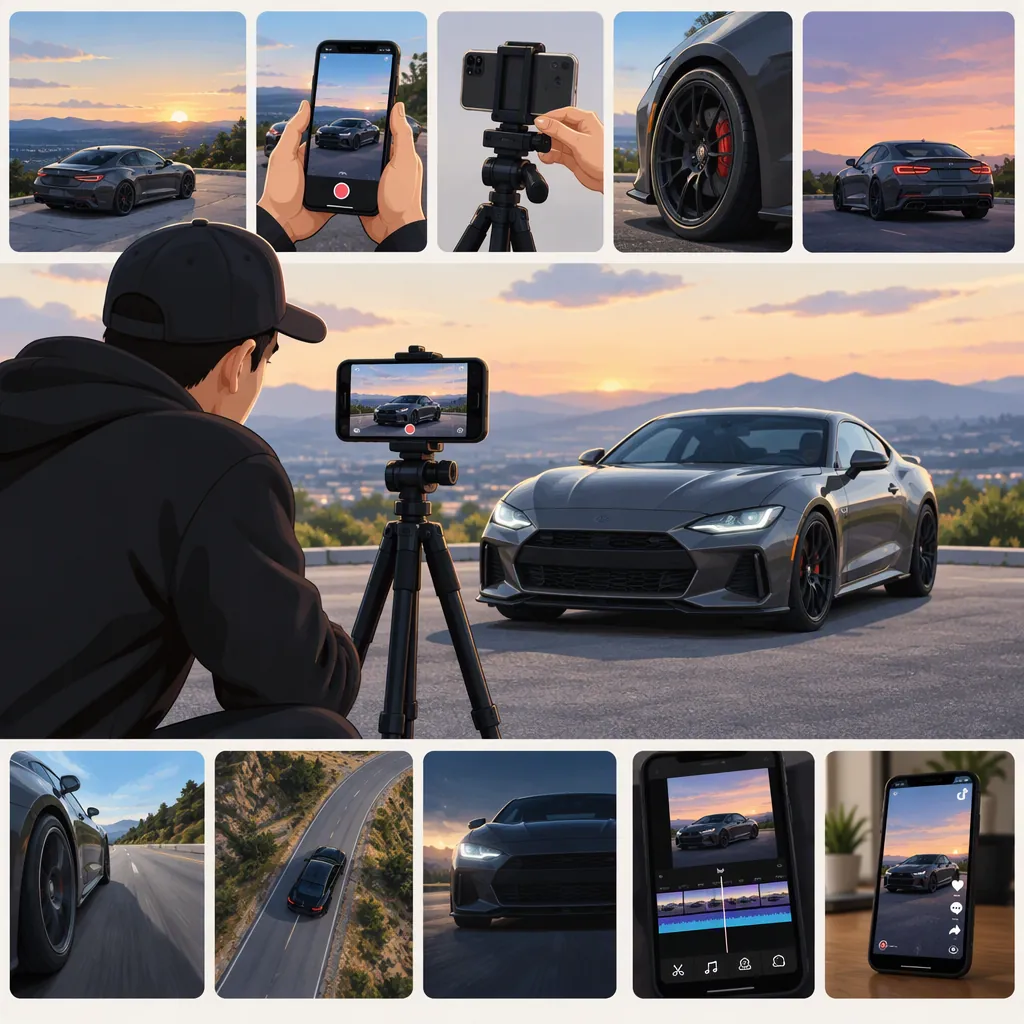
How to Make Cool Car TikTok Videos with Original Footage
Start with one visual idea: a reveal, a favorite detail, or a short walkaround. Film a safely parked car in vertical framing, alternating wide views with close-ups. Build a short edit around your strongest shot, cut deliberately to music or recorded sound, and use effects only when they support the idea. The workflow below is an original suggested exercise, not a verified TikTok trend formula or a guarantee of views.
Choose One Idea Before You Film
Decide what viewers should notice: the silhouette, a color, a wheel design, or a personal styling choice. Give that feature a beginning, a reveal, and a final detail rather than collecting unrelated clips.
For a first attempt, try a detail-to-reveal edit: open on a close-up, show the whole car, then return to the opening detail. Treat the timing below as a creative starting point, not a platform requirement.
A Suggested 15-Second Storyboard
0–2 seconds: Show a close-up of a distinctive light, wheel, or body line.
2–5 seconds: Reveal the parked car from a front three-quarter angle.
5–8 seconds: Follow a body line with a small, controlled camera movement.
8–11 seconds: Show a second detail that supports the same visual theme.
11–15 seconds: Finish on a clean wide shot or return to the opening detail.
Optional opening text: “One detail, then the whole car.”
Film a Parked Car with a Clear Shot List
Use a location where you have permission to film. Keep the car stationary, secure it against movement, and leave the engine off for this exercise. Do not operate a camera while driving or ask a driver to perform maneuvers for the video. Keep your filming position out of traffic and pedestrian routes.
Try vertical framing throughout. Leave some space around the car so you can adjust the crop later. Clean the camera lens, take a test clip, and check whether bright reflections hide the details you want to show.
For each angle, record a steady version before trying movement. Move slowly, watch your footing, and avoid stepping backward without checking your path. You do not need a moving car to make a dynamic edit.
Parked-Car Shot Checklist
□ Wide front three-quarter view with the whole car visible.
□ Side profile with a level horizon.
□ Close-up of a wheel, headlight, or other chosen detail.
□ Short movement along a body line, with a clear walking path.
□ Interior detail with the vehicle parked and engine off.
□ Closing shot that visually connects to the opening.
□ Review for accidental faces, plates, location details, or private belongings before sharing.
Build the Edit Around Your Best Shot
Review the footage and choose the clearest take from each angle. Put a compelling detail or reveal first; skip a long setup unless it contributes to the story.
Make an initial edit with straight cuts. Remove moments where you are finding the angle, adjusting your grip, or walking into position. Alternate wide and close views so the sequence does not repeat the same composition.
If you use music, try placing selected cuts on audible beats rather than cutting on every beat. If you use original recorded sound, let a useful sound cue guide a transition. Check permission for any audio you plan to publish; this guide does not establish music rights.
Add transitions only after the basic sequence works. For example, try cutting between two similarly framed wheel shots or matching the direction of two camera movements. Keep a speed change only if the subject remains readable. Avoid using effects to disguise a shot that would be better omitted.
Three-Pass Editing Routine
Pass 1 — Story: Select one opening, a reveal, supporting details, and an ending. Remove repeated angles.
Pass 2 — Rhythm: Adjust clip lengths and place a few deliberate cuts against music or sound cues. Watch the sequence without sound as well.
Pass 3 — Finish: Adjust brightness and color conservatively, add only necessary text, and remove effects that distract from the car.
Use Templates as Optional Structure
The supplied CapCut reference lists car-edit templates, including entries labeled “McLaren edit” and “Free Car Edit.” Despite its step-by-step title, the supplied page text is primarily a template listing and promotional copy, not a detailed filming tutorial. It does not substantiate promises of virality or increased views. [car-template-reference]
If you choose a template, treat it as a starting structure: replace the footage with your own, select shots that express your concept, and review each transition. Do not assume that a template establishes permission to use every included asset. A manual edit is also a reasonable choice when you want control over timing and shot order.
Template Review Checklist
□ Does the structure fit the story, rather than dictate it?
□ Is each clip your own footage or footage you have permission to use?
□ Have you checked the applicable permissions for music and other assets?
□ Are the car and its details still readable during transitions?
□ Have you removed text or branding that does not belong in your video?
Review the Finished Video Before Sharing
Watch the finished file on a phone, not just inside the editor. Check the opening frame, readable text, cropping, sound, and whether the final shot feels intentional.
Use a plain caption that describes the actual video rather than claiming an unverified trend or result. If the edit shows one styling detail, name that detail. If it is a walkaround, say so.
For your next version, change one creative choice at a time—for example, the opening shot or the pace. Compare the versions for clarity and your intended mood, without treating the exercise as a promise of audience growth.
Final Playback Checklist
□ The first frame gives the viewer something specific to look at.
□ The car stays within the intended crop.
□ Text is readable and does not cover the featured detail.
□ Sound is intentional, with no unwanted background conversation.
□ No unnecessary personal or location information is visible.
□ Audio and visual asset permissions have been checked.
□ The caption accurately describes the footage.
FAQ
Do I Need Expensive Equipment for This Exercise?
Start with the camera you already have. Use a parked car, deliberate framing, and short, controlled movements. Review a test clip before recording the full shot list. Consider extra equipment only after identifying a specific problem you need to solve.
How Can I Make a Parked Car Video Feel Dynamic?
Try alternating a wide reveal with close-up details, changing camera height, and using small camera movements. Create rhythm through clip length and deliberate cuts instead of moving the vehicle.
Do I Need a Car-Edit Template?
No template is required for the suggested workflow. You can arrange your own footage manually. The supplied CapCut page offers car-edit template listings, but it does not establish that using one will improve views or make a video go viral. [car-template-reference]
How Long Should My Car Video Be?
For this exercise, try the suggested 15-second storyboard, then shorten or extend it to suit your idea. Remove repeated shots and unnecessary setup. That duration is a creative starting point, not a verified optimal length for TikTok.
Sources
- [car-template-reference] How to Do the Car Trend on TikTok: Step-by-Step Guide