How to Make Duet Reels on Instagram with Remix
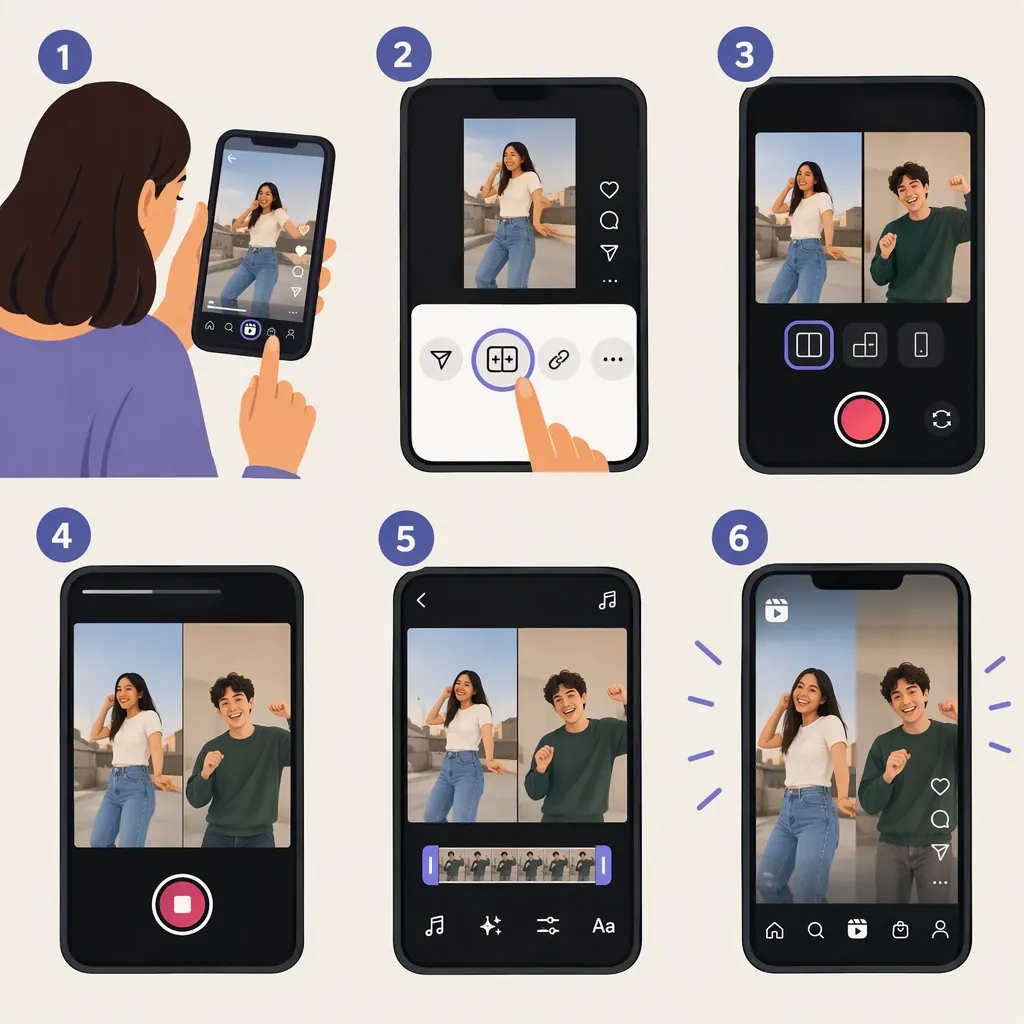
To make a duet-style Reel on Instagram, look for Remix in the original Reel’s three-dot menu, then record your contribution or upload footage alongside the original. Adjust the audio and preview the result before publishing. This workflow comes from Instagram’s 2021 Remix launch coverage; current menu labels and availability are not verified by the supplied sources. [remix-launch]
What a Duet Means on Instagram
For the side-by-side format commonly called a duet, Instagram’s documented feature is Reels Remix. The launch report describes adding your own video next to another user’s Reel, allowing a response or performance alongside the original clip. [remix-launch]
This guide covers that Remix workflow—not two people filming together or independently assembling a split-screen video. The supplied procedural evidence dates to the feature’s March 2021 launch, so treat the button names below as documented starting points rather than a verified map of today’s interface.
How to Make a Duet-Style Reel
The documented creation sequence starts from the Reel you want to respond to. [remix-launch]
- Open the original Reel. Choose a clip that makes sense for your response, harmony, demonstration, or reaction.
- Open its three-dot menu. Look for the Remix option. At launch, its label was “Remix this Reel.” [remix-launch]
- Add your contribution. The launch workflow supported recording a new video or uploading prerecorded footage next to the original. [remix-launch]
- Adjust the sound. Use any available original-audio and recorded-audio controls to balance the two contributions. Voiceover was also documented at launch. [remix-launch]
- Preview before publishing. Check timing, framing, and sound. Then follow the publishing prompts shown in your app; the supplied sources do not verify the current final-screen labels.
If you cannot find Remix, do not assume that every Reel supports it. See the availability notes below.
Duet Preparation Checklist
- Identify the moment in the original Reel you want to respond to.
- Decide whether to record a new contribution or use existing footage.
- Plan where your face, hands, or subject should appear.
- Make a short test take.
- Listen for timing errors and competing audio.
- Review the full preview before publishing.
Check Timing and Audio
For a musical duet, try a short section first rather than recording the entire performance immediately. Listen for whether your entrance matches the original and whether both parts remain understandable.
For a spoken reaction, decide when viewers should hear the original and when they should hear your explanation. Adjust the balance using the audio controls available in your editor; separate original and recorded audio controls were part of the documented launch feature. [remix-launch]
These are editing recommendations, not guarantees about specific controls in the current app. Preview with sound on, and avoid assuming that a visually aligned clip is also correctly synchronized.
If Remix Is Missing
The original creator’s remix settings are one relevant check. At launch, Instagram allowed creators to enable remixing on an existing Reel through its three-dot menu and disable remixing across their Reels through profile settings. [remix-launch]
However, that historical description does not establish why the option is missing on a particular Reel today. The supplied sources do not verify current eligibility rules, default settings, or account-specific restrictions.
As a practical check, compare the menus on another Reel. If you are working with a collaborator, ask them to inspect the remix controls available for their own Reel. Neither step guarantees access. If Remix remains unavailable, do not treat downloading and reuploading someone else’s clip as an automatic permission-based substitute.
FAQ
Is Instagram’s Duet Feature Called Remix?
Yes. The supplied launch report identifies Reels Remix as Instagram’s counterpart to the side-by-side duet format. Look for Remix rather than assuming the menu contains a button labeled Duet. [remix-launch]
Can I Use a Prerecorded Video in a Remix?
The documented launch workflow supported both recording a new contribution and uploading prerecorded footage. The supplied sources do not verify the current upload interface or its limits. [remix-launch]
How Do I Let Someone Remix My Reel?
At launch, creators could open the three-dot menu on their own existing Reel and select “Enable Remixing.” Check the controls shown in your current app rather than assuming that exact label is still present. Current default settings are not verified here. [remix-launch]