Why Your YouTube Videos Aren't Showing up in Search (and How to Fix It in YouTube Studio)
Wondering why your latest video gets zero traffic from search results? Here's the honest truth: YouTube videos fail to show up in search when your content misses search intent, your click-through rate (CTR) is low, or early viewer retention drops off quickly.
When early viewers bounce, YouTube's search algorithm assumes your content didn't answer their query. The good news? You can diagnose and fix every stage of this pipeline using your native YouTube Studio analytics.
Here is a quick overview of what you need to evaluate:
- Traffic Source Data: Uncover the exact terms driving impressions in the YouTube Search Terms report.
- Search Intent: Align titles and metadata with specific viewer queries instead of broad target keywords.
- Search CTR: Package your thumbnails and titles to outshine competing top-ranking videos.
- Early Retention: Hook viewers in the first 15 seconds to signal high search relevance.
Let's walk through the step-by-step diagnostic workflow inside YouTube Studio to get your videos discovered.
Checking Search Traffic Data in YouTube Studio Analytics
Before changing titles or redesigning thumbnails, you need to see what YouTube is currently doing with your video. Your analytics will show you if searchers are actually seeing your content in search results.
Navigating to Traffic Sources in YouTube Studio
To check your search data, open YouTube Studio and follow these steps:
- Click Content in the left menu.
- Select the specific video you want to diagnose.
- Click Analytics on the left menu, then select the Reach tab.
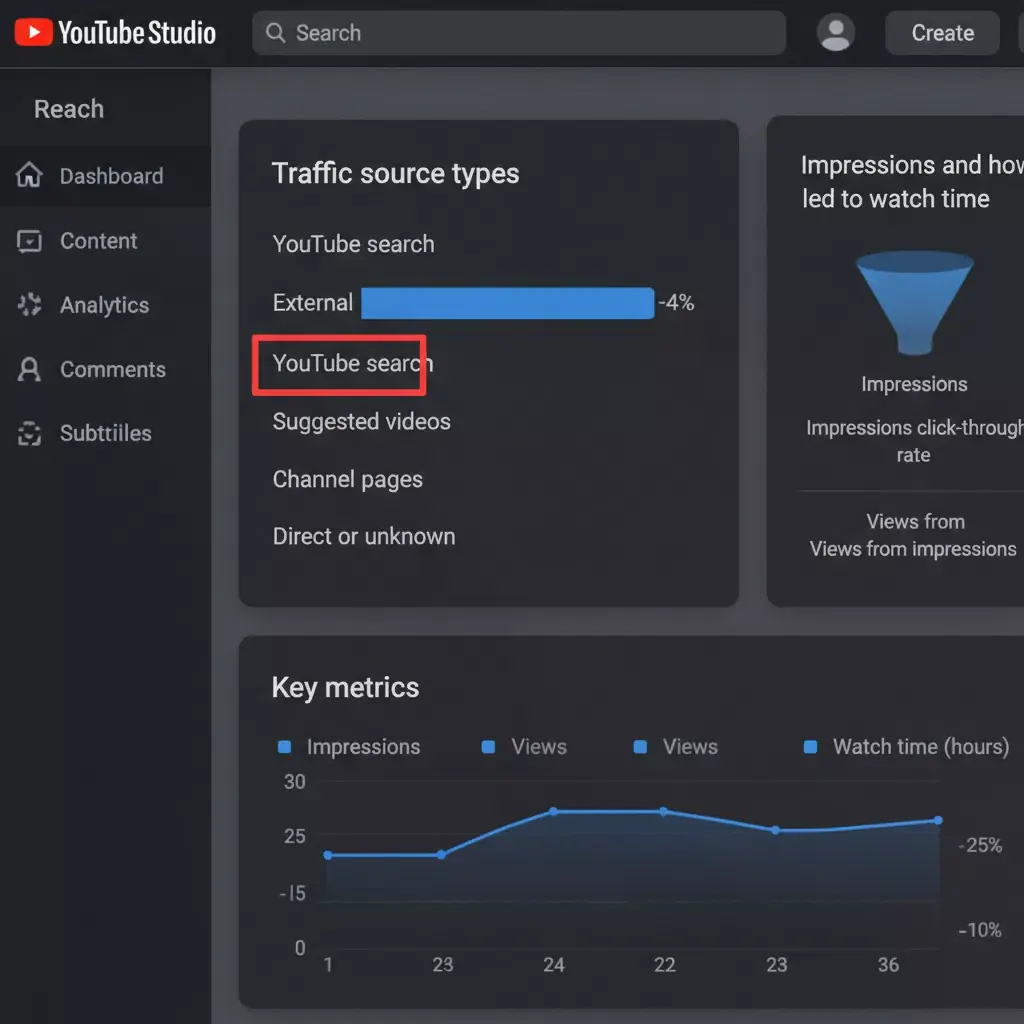
- Scroll down to the Traffic source types card.
Here, YouTube shows where your viewers come from. Look for YouTube search. If it accounts for less than 5% of your total views, YouTube isn't ranking your video prominently for relevant queries yet.
Analyzing the YouTube Search Terms Report
Click on YouTube search inside the traffic sources card to open the expanded report.
This view reveals the exact search queries viewers typed before seeing your video thumbnail. Look closely at this list.
Are viewers finding your video through the precise terms you intended? Often, you'll spot a mismatch. For example, if you created a video about "best lighting setups" but your impressions come from "cheap desk lamp review", searchers are landing on your video with different expectations than what you built.
Fixing Topic and Search Intent Alignment
When your video fails to rank, the most common culprit is a mismatch between your content and what searchers want to see.
Evaluating Search Query Specificity Against Existing Results
To fix intent mismatches, test your main keyword in a private browsing window on YouTube:
- Analyze the top 3 results: Are they fast 2-minute answers, deep 20-minute tutorials, or comparison roundups?
- Identify the format standard: If top videos are step-by-step guides, a general opinion video won't rank.
- Match the depth: If searchers want a quick fix, long-winded introductions will send them back to search results.
Aligning your content with exact search intent tells YouTube's system that your video satisfies the user's search goal.
Matching Video Titles and Metadata to Exact Viewer Terms
Place your primary search phrase within the first 60 characters of your video title. Searchers scan titles rapidly, so your core term needs to be immediately visible on mobile screens.
Avoid stuffing keywords together in an unnatural sentence. Instead, combine your target query with a clear value promise.
Example Title Optimization:
Weak Title: My Favorite Editing Tips & Tricks (2025 Workflow)
Optimized Title: How to Edit YouTube Shorts in Premiere Pro (Step-by-Step)
In your video description, write two natural sentences incorporating your target phrase and primary related terms within the first two lines.
Optimizing Packaging to Improve Search Click-Through Rates
Getting your thumbnail displayed in search results is only half the battle. If searchers scroll past your video, YouTube will stop testing it in search feeds.
Interpreting Impressions and Click-Through Rate Metrics
In your video's Reach tab, check your click-through rate alongside total impressions.
A high impression count paired with a CTR below 3% in search indicates a packaging problem. Your video appears in search results, but searchers prefer competing options.
Designing Search-Focused Thumbnails and Title Text
Search thumbnails require a different design strategy than suggested feed thumbnails:
- Use high-contrast visuals: Ensure your visual subject stands out against YouTube's dark and light background themes.
- Limit on-screen text: Keep text overlays under four words. Use large, bold fonts that remain readable on small mobile screens.
- Show the end result: If your video answers a "how-to" query, show the finished project or problem solved directly in the thumbnail.
Improving Early Retention to Signal Search Relevance
Click-through rate gets searchers through the door, but viewer retention keeps your video ranked.
Diagnosing Audience Drop-Off in the First 30 Seconds
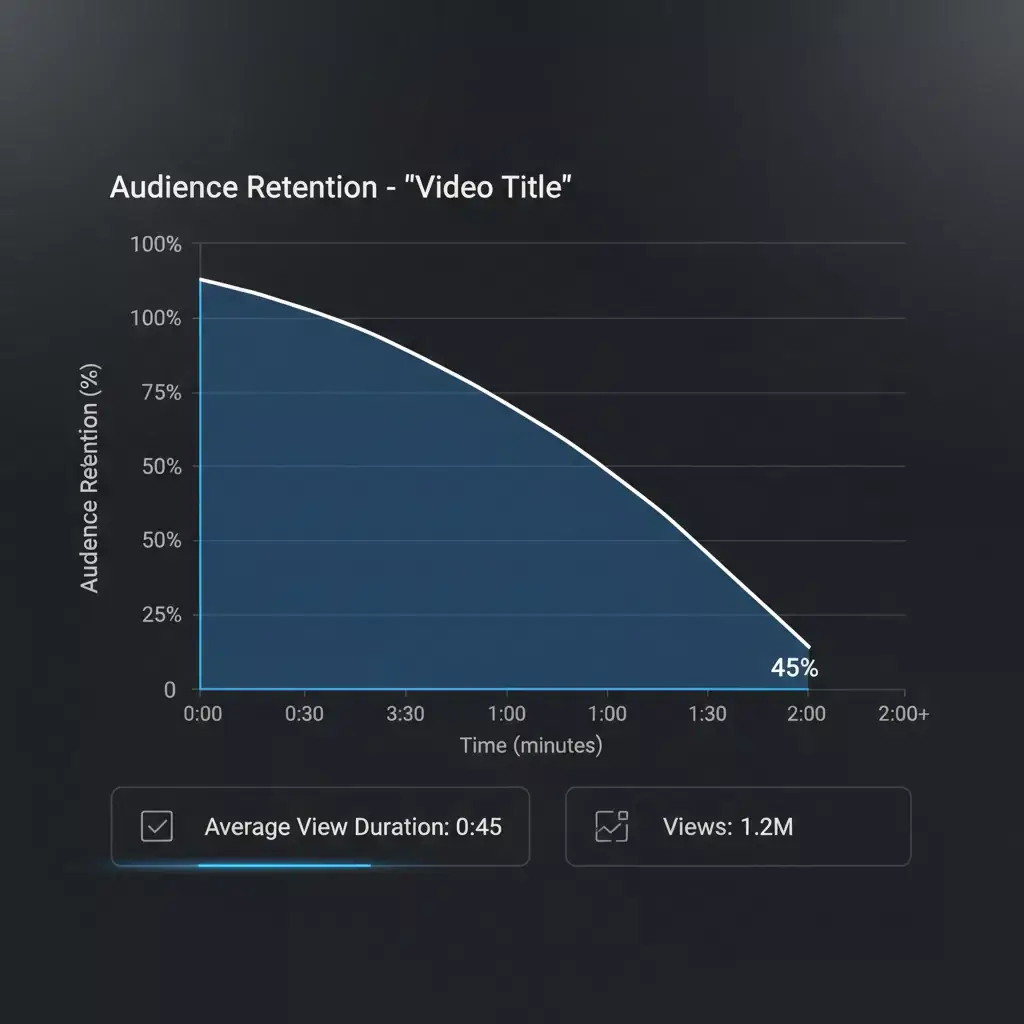
Navigate to the Overview tab in YouTube Studio Analytics and look at the Key moments for audience retention graph.
Pay close attention to the first 30 seconds:
- A steep drop in the first 15 seconds signals that viewers felt misled by your title or thumbnail.
- If retention drops below 50% within 30 seconds, YouTube assumes your video did not answer the search query quickly enough.
Structuring Video Hooks to Deliver Immediate Value
To retain search traffic from the first second:
- Delete channel intro animations: Bumper graphics push searchers to click away immediately.
- Confirm the search query instantly: State the exact solution or topic in your opening sentence.
- Outline the payoff: Briefly tell the viewer what they will learn or accomplish by watching until the end.
Summary Checklist for Fixing YouTube Search Discovery
When a search-targeted video isn't getting search traffic, systematically work through these diagnostic checks.
Key Diagnostic Actions for Every Search-Targeted Video
Use this reference table to evaluate underperforming search videos and apply corrective updates:
| Diagnostic Focus | Metric / Report to Check | What to Look For | Actionable Fix |
|---|---|---|---|
| Search Impression Check | Traffic Sources: YouTube Search | Under 5% search traffic contribution | Align title and description keywords with explicit viewer terms. |
| Packaging Appeal | Reach Tab: Search CTR | Click-through rate below 3-4% | Redesign thumbnail with high-contrast text and a direct visual answer. |
| Hook Retention | Overview Tab: First 30s Retention | Retention drop steeper than 50% | Trim first 15 seconds; remove intro stingers and deliver immediate value. |
| Query Match | Search Terms Report | Mismatched search queries driving views | Update metadata or adjust video chapter titles to match real search terms. |
For a deeper look at search data, see YouTube Search Analytics.
FAQ
How Long Does It Take for YouTube to Index and Rank a Video in Search?
YouTube does not publish a fixed timetable for when a new video appears or settles in search results. Check that the video is public and searchable, then review its search traffic in YouTube Studio over time. YouTube explains that relevance, engagement, and quality all affect search ranking.
Does Updating a Video Title or Thumbnail Reset Its YouTube Search Ranking?
Changing your title or thumbnail does not reset your overall channel authority or existing view count, but it changes how searchers interact with your video, which will directly alter your search click-through rate and placement moving forward.
Can Tags Help My Video Rank in YouTube Search?
Tags play a very minor role in search discovery on modern YouTube, serving mainly to help correct common spelling mistakes; focus your optimization efforts on title phrasing, thumbnail clarity, and high early viewer retention instead.