The Post-Campaign Sponsorship Recap: What to Send Brands 14 Days After Your Video Goes Live
After a sponsored video goes live, a concise results recap can give the brand a useful record and open a discussion about future work.
A 14-day recap is one practical checkpoint, not a universal reporting deadline. Use it to compare early performance with later data, then send the brand a clear summary when enough relevant metrics are available.
A useful recap may include:
- Quantitative Metrics: Core performance data, including total reach, average watch time, and click-through rates.
- Qualitative Proof: Screenshots of positive brand sentiment and high-intent audience comments.
- Demographic Alignment: Proof that your actual viewers match the brand's target buyer persona.
- A Renewal Pitch: A concrete proposal for a follow-up campaign, seasonal launch, or multi-video package.
Here is how to structure a recap that the brand can use, while keeping measured outcomes separate from assumptions.
Why the 14-Day Window Matters for Post-Campaign Recaps
Allowing Algorithm Stabilization and Long-Tail Reach
An early report can be useful, but it may not capture later views or actions.
Performance can continue to change after the first two days. Compare day 2 and day 14 for your own post, and label each snapshot with its date range.
A later snapshot may show additional reach. It still is not a final lifetime total, and views alone do not establish return on investment.
Capitalizing on Warm Brand Relationships Before Budget Reallocation
Timing your follow-up is just as critical as the data itself.
Ask when the brand reviews campaign results and plans its next campaign. Use that date to time your follow-up.
Two weeks is a reasonable example checkpoint when the agreement does not specify a reporting date. Adjust it to the platform, campaign length, and data availability.
Core Metrics and Insights to Include in the Recap Report
Quantitative Data: Impressions, Retention Rate, and Click-Throughs
Brands care about specific performance indicators. To make your report valuable, skip vanity metrics and focus on numbers that reflect real viewer engagement.
Include the metrics that the campaign actually measured and that you can access:
- Total Reach and Impressions: The overall exposure your video generated across feeds.
- Audience Retention: The percentage of viewers who stayed tuned during the sponsored segment.
- Click-Through Rate: The proportion of viewers who clicked the trackable link in your description or bio.
| Metric Category | Key Data Point | What It Proves to the Brand |
|---|---|---|
| Distribution | Total Impressions & Reach | Quantifies overall brand awareness and top-of-funnel exposure. |
| Attention | Sponsored Segment Retention, if available | Shows where viewers continued watching. |
| Traffic | Link Clicks & CTR, if tracked | Shows visits or taps, not confirmed purchases. |
| Conversion | Discount Code Uses, if shared | Shows attributed uses under the program’s rules. |
If segment retention is available, use it to show how viewers behaved during the integration.
Qualitative Proof: Sentiment Analysis and High-Intent Comments
Numbers tell only half the story. Qualitative proof shows how your audience actually feels about the product.
Scan your comment section for high-intent viewer responses. Look for comments like:
- "Just ordered mine using your code!"
- "I've been looking for a product like this for months."
- "Does this work well for sensitive skin? Thinking of buying."
Quote or screenshot a few relevant public comments with context. Treat them as qualitative feedback, not verified purchase data.
Framing Incomplete Data or Underperforming Reach
Not every sponsored video hits peak view targets. If your total reach fell short of expectations, do not hide the numbers or make excuses.
Instead, reframe the narrative around secondary strengths:
- If total views were low but retention was high, emphasize how deeply the core audience engaged with the message.
- If link clicks were modest, point out strong comment sentiment and audience interest.
- Offer a lightweight gesture of good faith, such as adding an extra organic shoutout in an upcoming video or proposing a supplementary story link if it fits the agreement and audience.
Focusing on deep audience trust keeps the commercial relationship positive even when algorithm distribution varies.
Structuring the Post-Campaign Deliverable for Brand Decision-Makers
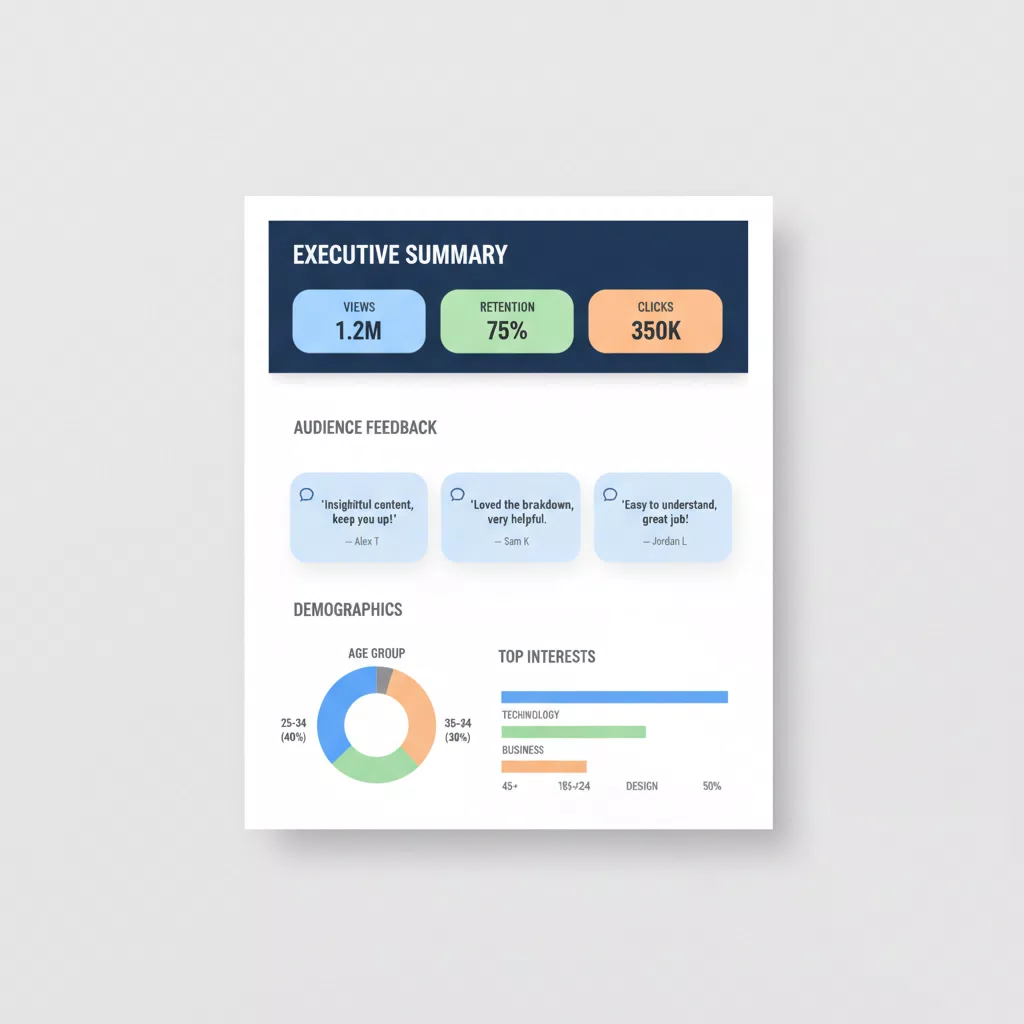
The One-Page Executive Summary Deck
Brand managers are busy. They need a document they can easily forward to their VP of Marketing or finance team to justify campaign spending.
Keep your recap report to a single, beautifully organized slide or PDF page.
Structure the document into three distinct blocks: top-line numbers at the header, qualitative comment callouts in the middle, and strategic takeaways at the bottom.
Connecting Content Performance to Brand Audience Alignment
To secure long-term partnerships, show the brand that your audience matches their ideal customer.
Include a small demographic breakdown snapshot from your channel analytics. Show details like:
- Top Geographic Regions: (e.g., 65% US-based traffic)
- Age Distribution: (e.g., 78% aged 25–34)
- Gender Split: (e.g., 82% female viewers)
Compare your available audience data with the brand’s stated target, while avoiding a claim that the post caused sales you cannot measure.
Transitioning the Recap into a Repeat Sponsorship Pitch
Proposing Next-Step Deliverables and Campaign Angles
If the results and relationship justify it, add a relevant next-step proposal. A recap can also stand alone when the brand has no immediate follow-up need.
Instead of asking a vague question like "Would you like to work together again?", pitch two concrete campaign concepts tailored to their upcoming marketing calendar.
Illustrative Recap Follow-Up Script: "Hi Sarah,
Attached is our 14-day performance recap for the summer launch video. We hit 45,000 views with a 72% segment retention rate, generating 340 direct link clicks.
Given how strongly the audience reacted to the product demonstration, I'd love to lock in coverage for your upcoming Q4 holiday campaign. I've put together two multi-video package options below to maintain this momentum."
Clear concepts make the next discussion more specific.
Adjusting Rates Based on Account Valuation and Proven Results
Use the measured results, new scope, and paid-use rights to discuss the next fee. A good recap alone does not guarantee a higher rate.
Use the campaign data you actually have. If the brand shares conversion or acquisition-cost data, include it with the agreed attribution method; otherwise avoid implying you know those numbers.
Offering bundled multi-video packages—such as a 3-video seasonal integration series—also allows you to raise total deal size while offering the brand a slight per-video discount.
Conclusion: Building Repeat Revenue Through Systematic Post-Campaign Follow-Ups
Turning single deals into recurring income comes down to a clear system:
- Mark Day 14 on your calendar immediately after uploading any sponsored video.
- Pull exact analytics covering reach, retention rate, and outbound link clicks.
- Curate screenshot proof of high-intent viewer comments.
- Package the insights into a clean, one-page executive summary.
- Attach a concrete pitch for your next campaign angle with updated package rates.
A clear recap gives both sides a better basis for deciding whether another campaign makes sense.
FAQ
What If a Brand Requests Campaign Performance Metrics Before the 14-Day Mark?
Provide an early snapshot covering 48-hour reach and immediate engagement, but explicitly mention that the later report will cover a longer measurement window.
How Should I Handle Reporting If the Video Significantly Underperformed?
Focus your report on qualitative strengths like positive audience comment sentiment, high segment retention, or viewer demographic alignment, and offer a light supplementary story or post to maintain a good working relationship.
Should I Include Affiliate Link Sales Revenue in My 14-Day Recap Report?
Include attributed sales only if the program or brand shares reliable figures. Keep link clicks separate from confirmed sales, and note the reporting window.