A Brand Wants to Whitelist Your Viral Reel for 90 Days: How to Price Extension Terms, Access, and Renewal Clauses
When a brand asks to run ads through your handle for 90 days, handing over control can feel risky.
Here is the key to pricing a 90-day Instagram whitelisting (Partnership Ads) deal: always separate your base content creation rate from paid advertising usage. For an illustrative scenario, if your base organic rate is $1,000, adding an illustrative monthly licensing fee of 40% per 30-day block results in a $1,200 usage add-on and a $2,200 total payout. You must also grant access strictly through Meta Business Manager or Partnership Ad codes, set automatic 90-day access expiration, and charge extra for content modifications or category exclusivity.
In other words: organic posting and paid ad usage are two completely different products.
Quick Comparison: Organic Sponsorship Vs. 90-Day Whitelisting
| Rights & Terms | Organic Sponsorship | 90-Day Whitelisting (Partnership Ads) |
|---|---|---|
| Target Audience | Your existing organic followers | Cold targeted audiences using brand ad spend |
| Access Method | Organic post tagging or collab posts | Meta Business Manager / Partnership Ad codes |
| Pricing Model | Single base creation fee | Base rate + recurring monthly paid usage fee |
| File Ownership | Creator retains Reel video file | Creator keeps file; brand gets limited ad licensing |
| Access Duration | Remains on profile grid indefinitely | Strictly capped at 90 days with auto-expiration |
Here is the step-by-step breakdown to calculate your 90-day licensing fees, configure Meta permissions securely, and draft strong renewal clauses.
Understanding 90-Day Whitelisting and Usage Scope
When a brand wants to put paid ad dollars behind your organic Reel, they aren't just paying for extra reach. They are purchasing access to your identity, social proof, and personal handle.
Whitelisting Vs. Organic Sponsorships
In a standard organic sponsorship, your job ends once the post goes live on your profile grid. The content relies on your organic follower reach and Instagram's algorithm.
Whitelisting—officially called Partnership Ads on Meta—is completely different. The brand uses their own ad budget to run your video as a dark post across targeted feeds. This content reaches audiences who don't follow you, using your username and profile picture to build instant trust.
Separating Ad Rights from Raw File Delivery
Granting 90-day advertising access through your handle does not mean the brand owns your content.
You retain full copyright of your original video file. Giving permission to run ads via Meta tools does not grant the brand permission to:
- Upload your raw video file natively to their own Instagram or TikTok grid.
- Edit your voiceover or alter your core brand message without consent.
- Use your likeness in print, billboards, or email campaigns.
Keep your organic creation fees separate from paid ad distribution rights in every agreement.
Structuring the 90-Day Licensing Fee and Editing Rules
To price a 90-day whitelisting deal, start with your base organic creation rate. Then stack a recurring monthly paid usage fee on top of it.
Calculating the 90-Day Paid Usage Premium
For an illustrative scenario, let's say your standard organic creation rate for a Reel is $1,000.
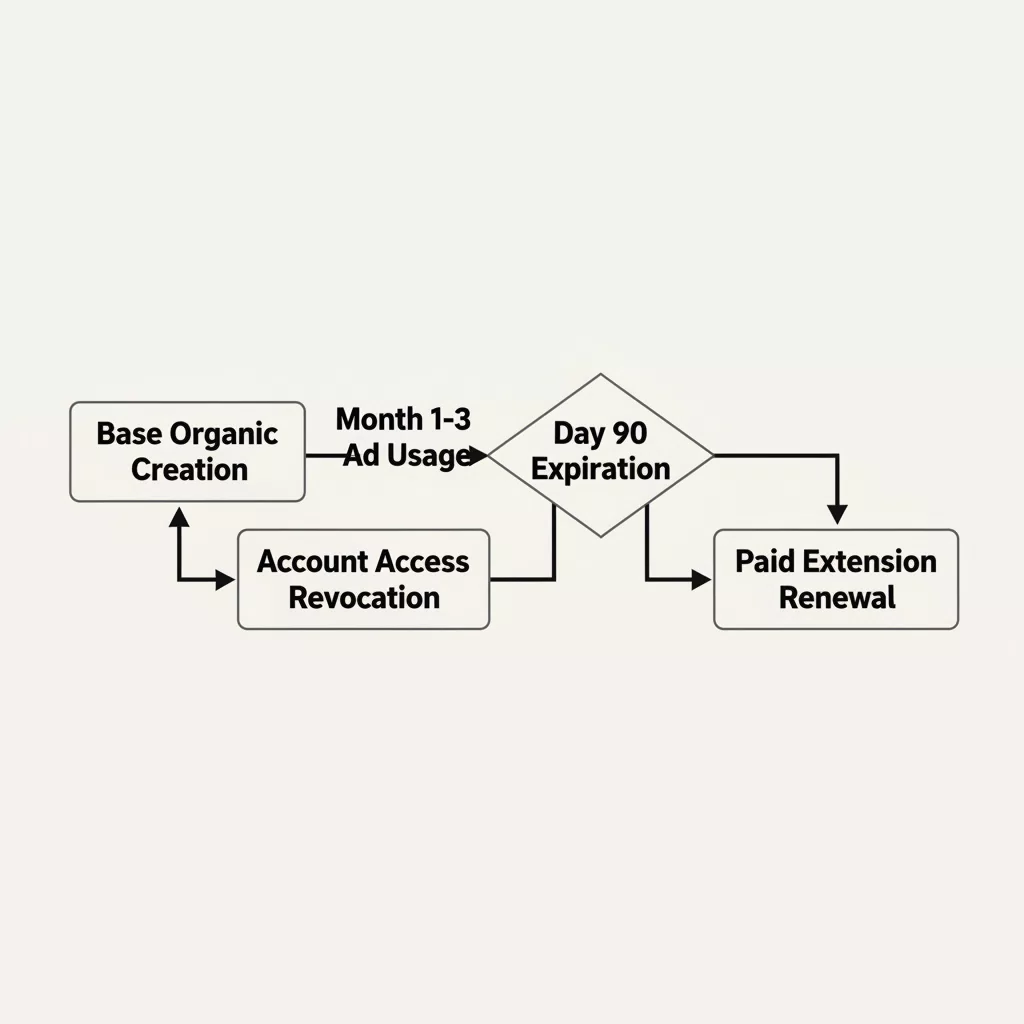
If you charge an illustrative monthly paid licensing fee of 40% per 30-day block, your paid usage add-on will be $400 per month. Over a 90-day campaign (three 30-day blocks), your total usage fee comes out to $1,200 (120% total add-on).
Here is how that exact illustrative pricing structure breaks down:
| Project Deliverable / Term | Licensing Period | Fee Calculation | Total Payout |
|---|---|---|---|
| Base Organic Creation | Lifetime profile posting | Base Rate | $1,000 |
| Month 1 Paid Ad Usage | Days 1–30 | 40% of Base ($400) | $400 |
| Month 2 Paid Ad Usage | Days 31–60 | 40% of Base ($400) | $400 |
| Month 3 Paid Ad Usage | Days 61–90 | 40% of Base ($400) | $400 |
| Total 90-Day Package | 90 Days Active Ads | Base + 120% Add-On | $2,200 |
By breaking the deal into 30-day licensing blocks, you protect your revenue while giving the brand a clear path to run high-converting ad variations.
Defining Permissible Ad Modifications
Brands often want to test different call-to-action (CTA) text or crop your Reel for ad placements. Your contract must define exactly what edits are allowed.
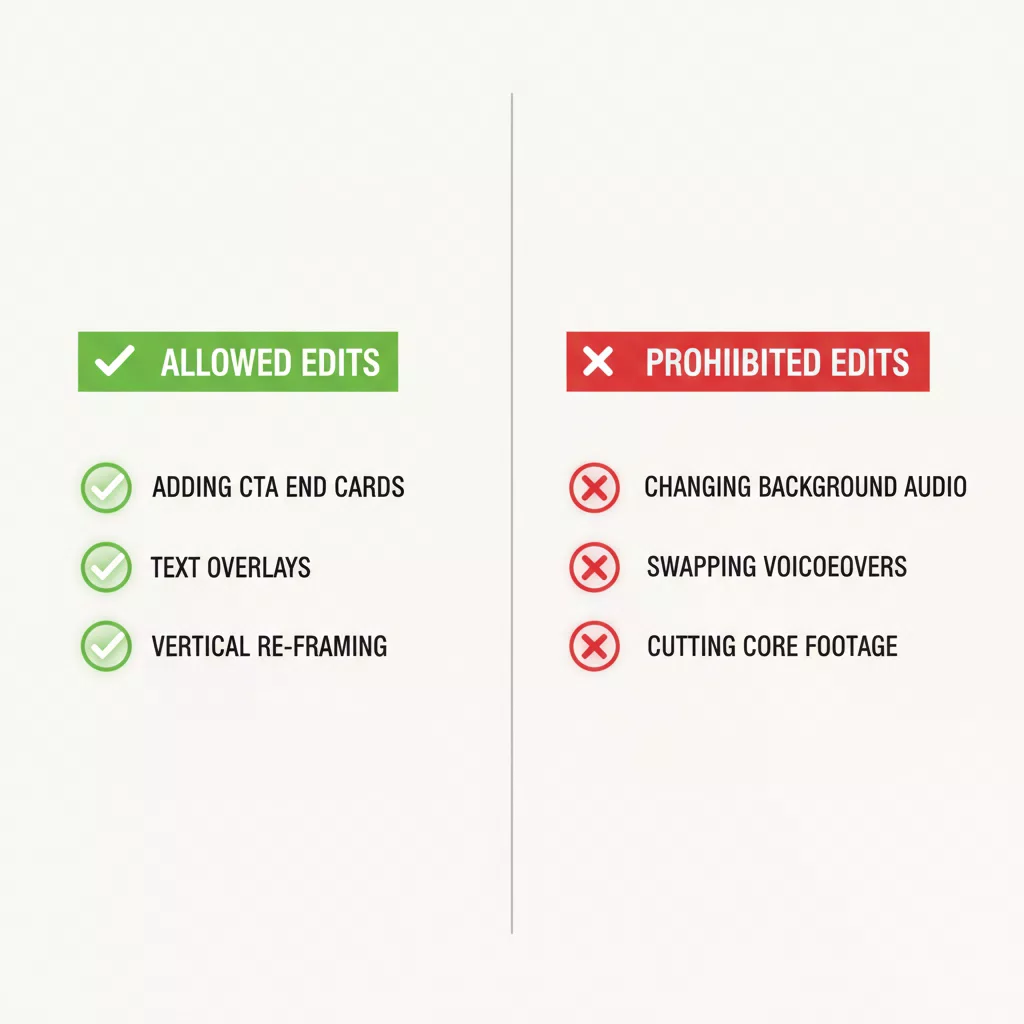
Allowed Edits:
- Adding a branded call-to-action end card (e.g., "Shop Now for 20% Off").
- Translating text overlays into another language for regional ads.
- Re-framing the aspect ratio for Instagram Stories or Reels ad formats.
Prohibited Edits:
- Using AI voice cloning to alter your script.
- Inserting unapproved audio tracks or changing the original background sound.
- Splicing your footage alongside competing products.
Configuring Secure Meta Partnership Access
Never give a brand direct login credentials to your Instagram profile or personal Facebook account.
Setting up Meta Partnership Ad Permissions
Instead of handing over login details, grant access securely through Meta Business Manager using a Partnership Ad code.
To generate access without risking security:
- Open your Instagram post settings and select Advanced Settings.
- Toggle on Allow business partner to boost.
- Copy the unique Partnership Ad code generated by Instagram.
- Send the code to the brand's ad team so they can link the post in Meta Ads Manager.
This workflow lets the brand run ad budget behind your Reel while protecting your private messages, profile settings, and account control.
Enforcing Access Expiration Dates
When authorizing ad access, set strict start and end dates inside Meta Business Manager or your brand contract.
Ensure the campaign access is explicitly configured to revoke automatically on day 90. If the brand wants to keep running the ad on day 91, they will need to sign a extension agreement.
Drafting Renewal Clauses, Terminations, and Exclusivity
Protect your earning potential by planning for campaign success before you sign.
Pricing Extension Terms and Escalation Rates
If your Reel generates high conversions for the brand during the initial 90 days, they will likely want to extend the run.
Include a rate escalation clause in your original agreement. For instance, if the brand renews for an additional 30 days after day 90, charge an illustrative 50% monthly rate ($500 per 30 days based on your $1,000 base rate) rather than the initial 40% rate.
Sample Contract Clause: "Brand may extend paid advertising rights beyond the initial 90-day term in 30-day increments at an illustrative rate of $500 per 30 days (50% of base creation rate). Extension payments must be cleared prior to the start of the requested 30-day block. Access will automatically terminate on day 91 if no extension agreement is executed."
Managing Exclusivity Premiums During Whitelisting
Running ads through your handle for 90 days means your face will actively promote that brand across social feeds for three full months.
If the brand requests category exclusivity—preventing you from working with competing companies during those 90 days—charge an additional exclusivity fee. A practical rule of thumb is to add an illustrative 30% to 50% premium on top of your total package price to cover lost partnership opportunities.
Essential Checklist for 90-Day Whitelisting Agreements
Before launching a 90-day Partnership Ad campaign, review every term to protect your account and maximize payout.
| Requirement | Status | Verification Detail |
|---|---|---|
| Separate Pricing | Checked | Base organic creation fee is billed separately from the 90-day paid usage fee. |
| Usage Term Capped | Checked | Paid ad rights explicitly terminate after 90 days with auto-expiration enabled. |
| Secure Platform Access | Checked | Permissions granted via Meta Partnership Ad codes—no account passwords shared. |
| Editing Limits | Checked | Permissible edits (CTA cards, cropping) and prohibited edits (AI audio, cuts) defined. |
| Exclusivity Terms | Checked | Category exclusivity scope is defined and charged as an extra fee item. |
| Renewal Terms | Checked | 30-day extension rates and payment deadlines agreed upon in advance. |
FAQ
What Happens If a Brand Continues Running Ads After the 90-Day Term Ends?
If your contract specifies auto-expiration and access was granted via Meta Partnership Ad codes, access automatically ends on day 90. If the brand continues using unauthorized ad assets natively, send a formal notice detailing breach of contract and bill them for unauthorized usage using your agreed extension rates.
Should I Grant Raw Video File Ownership for a 90-Day Whitelisting Deal?
No. Whitelisting only grants temporary ad distribution rights through your handle. You should retain full copyright ownership of the raw video file unless the brand pays a separate, significant buyout fee.
How Do I Charge for Category Exclusivity During a 90-Day Ad Campaign?
Calculate category exclusivity as an additional add-on fee (for example, an extra 30% to 50% of your total project fee) to compensate for potential income lost by declining competitor brand deals during those three months.