How to Convert TikTok View and Follower Metrics into Media Kit Rate Cards
To build an accurate TikTok rate card, stop pricing your brand deals based on total follower count. Instead, base your baseline pricing on your 30-day median video views and engagement rate.
Followers reflect potential reach, but brands pay for actual views. Applying a standard baseline CPM (cost per mille) to your median view count creates a fair, data-backed starting price that brands take seriously.
Here is the quick breakdown of how to turn raw TikTok metrics into a profitable rate card:
- Calculate 30-Day Median Views: Use your middle view count over the last month to project realistic organic reach.
- Apply Baseline CPM: Multiply your median views per 1,000 by a target $25–$35 CPM baseline to establish your base posting fee.
- Apply Niche & Engagement Multipliers: Add 10%–50% to your base rate for high engagement (>8%) or high-value niches like finance, tech, or skincare.
- Unbundle Deliverables: Price video production, organic feed posting, Spark Ads usage rights (ad whitelisting), and category exclusivity as separate line items.
Here is how to extract these key TikTok metrics step-by-step and format them into a high-converting media kit.
Extracting Key TikTok Performance Metrics for Pricing
When brands look at your TikTok account, they don't buy your past history. They buy your future reach.
That is why relying on raw follower counts to price your brand sponsorships leads to missed opportunities—or severely underpriced work.
Calculating 30-Day Median Views over Total Follower Count
Follower count on TikTok is largely a vanity metric. Because the algorithm prioritizes the For You feed over the Following feed, an account with 100,000 followers might average 2,000 views per video, while an account with 15,000 followers might average 25,000 views.
To find your true baseline, open your [TikTok Studio analytics]/academy/analytics-view-interpret-tiktok-video-main) and pull your video view counts for the last 30 days.
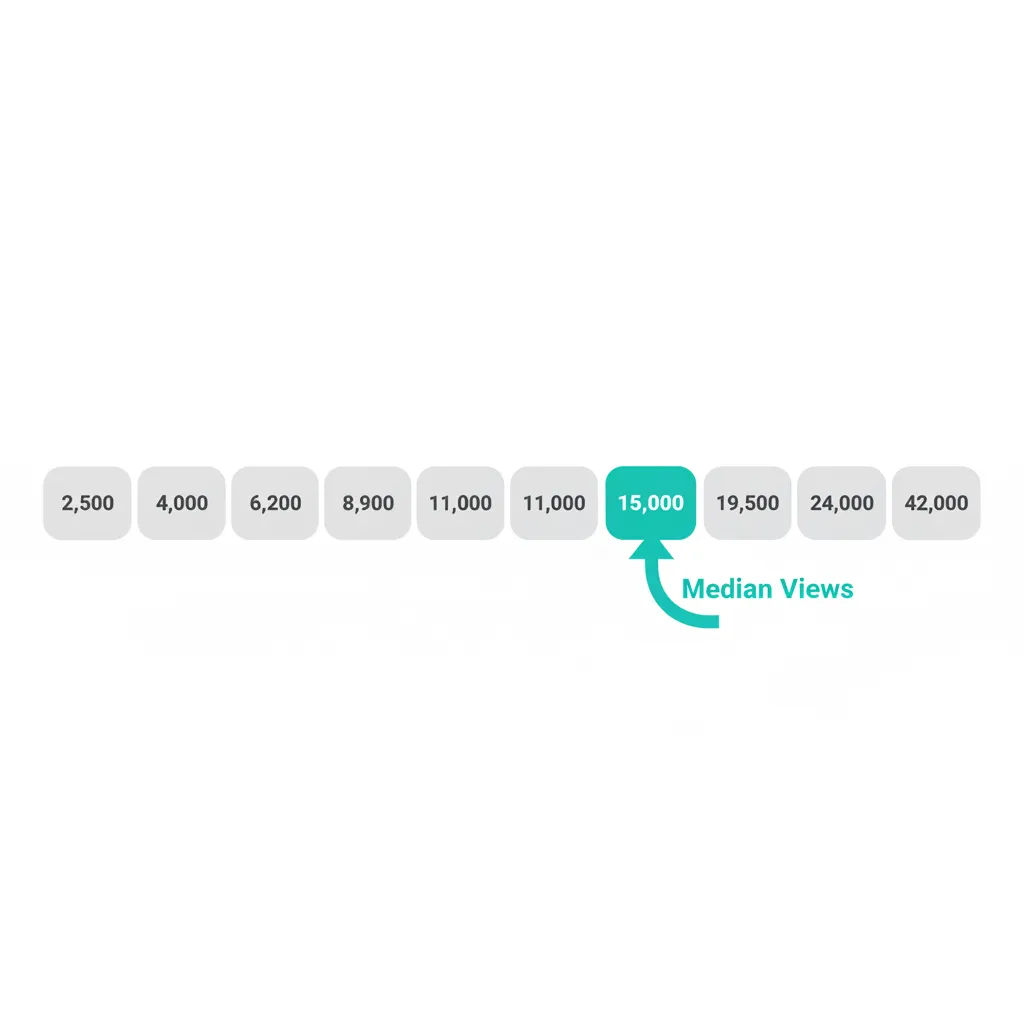
Instead of taking an average (which gets distorted by viral hits), calculate your median views. List your last 10 to 20 videos in order of view count from lowest to highest, and pick the middle number. This represents your guaranteed typical reach.
Measuring Audience Engagement Rate per Video View
Brands care about whether people actually pay attention to your videos.
While traditional platforms calculate engagement against total followers, TikTok requires calculating engagement rate per view (ERv). This measures direct actions per viewer.
Here is the formula:
ERv = ((Likes + Comments + Shares) / Total Views) * 100
A strong TikTok ERv typically ranges between 5% and 10%. If your ERv consistently hits 8% or higher, your audience is highly active, which gives you strong leverage to charge premium rates.
Step-By-Step Worked Example: Baseline Pricing Calculation
Let's walk through turning these raw metrics into a baseline dollar amount using a practical calculation.
Applying a Baseline CPM Formula to Median Reach
Suppose your account metrics look like this:
- Total Followers: 50,000
- 30-Day Median Views: 20,000
- Average Engagement Rate per View: 6%
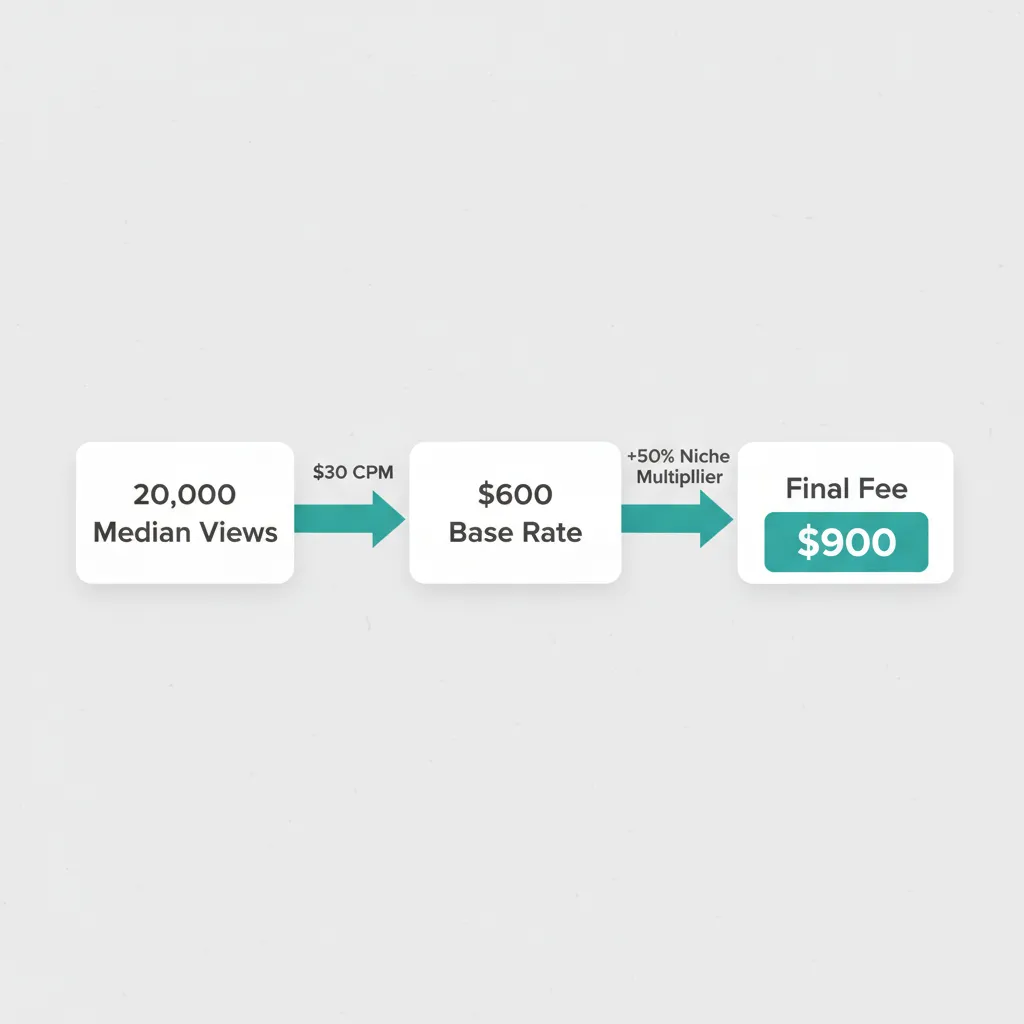
To set your base fee, apply a standard baseline CPM (cost per mille, or cost per thousand views). In creator marketing, a standard TikTok baseline CPM typically ranges between $25 and $35.
Base Posting Fee = (Median Views / 1,000) * Target CPM
Using a $30 CPM on 20,000 median views:
(20,000 / 1,000) * $30 = $600
This $600 represents your baseline organic feed posting fee for a single video.
Adjusting Base Pricing for Niche Authority and High Engagement
Your baseline is just the starting point. Next, adjust your rate upwards using multiplier percentages based on your niche and audience quality:
- High Engagement (>8% ERv): Add +15% to +30%.
- High-Value Niches (Tech, B2B, Finance, Skincare): Add +20% to +50% because audience acquisition cost in these sectors is naturally higher.
- Complex Production: Add +20% to +40% for dedicated props, external audio gear, or custom scripting.
If our example creator operates in the financial niche (+30%) and has an 9% engagement rate (+20%), their adjusted baseline becomes:
$600 + 50% = $900
Unbundling the Rate Card: Deliverables, Usage Rights, and Exclusivity
One of the biggest mistakes creators make is bundling everything into a single flat fee. When you include organic posting, commercial ad rights, and exclusivity together, you leave money on the table.
Separating Content Production Costs from Posting Fees
Always unbundle your services into clear line items. Video production takes time, talent, and editing skills—even if the brand decides not to post the video on your organic channel.
For instance, if a brand wants pure UGC (User Generated Content) to post strictly on their own social channels without feed distribution on your account, charge a standalone production fee (e.g., $300 to $500 per asset) rather than your organic posting rate.
| Deliverable Type | What is Included | Pricing Basis |
|---|---|---|
| Organic Feed Post | Scripting, filming, editing, and organic posting to your feed | Median CPM + Niche Multiplier |
| UGC Asset Only | Scripting, filming, raw/edited file delivery (no feed post) | Fixed Content Production Fee |
| Spark Ads Whitelisting | Identity code granting brand permission to boost your post as an ad | Monthly percentage of Base Fee (e.g., 30–50%/mo) |
| Category Exclusivity | Agreement not to promote competitor products for a set timeframe | Monthly percentage bump (e.g., 20–50%/mo) |
Pricing Paid Usage Rights, Spark Ads, and Exclusivity Clauses
When a brand runs Spark Ads or requests digital licensing, they amplify your video with ad spend. You must charge for this commercial value.
Use these standard pricing benchmarks for usage rights:
- Spark Ads / Whitelisting (30 Days): Charge an additional 30% to 50% of your organic base rate.
- Spark Ads / Whitelisting (90 Days): Charge an additional 80% to 100% of your organic base rate.
- Category Exclusivity (30 Days): Charge 30% to 50% on top of the total deal fee to cover lost sponsorship opportunities from competing brands.
Example Media Kit Line Item Wording: "Base Organic TikTok Deliverable (1x Video): $900. Optional Add-ons: 30-day Spark Ads Whitelisting (+30% / $270); 30-day Category Exclusivity (+30% / $270). Total Campaign Package: $1,440."
Building the Media Kit Data and Rate Card Section
Now that you have calculated your numbers, you need to present them clearly so brand managers can make a quick approval decision.
Structuring the Proof Section with Verified Analytics
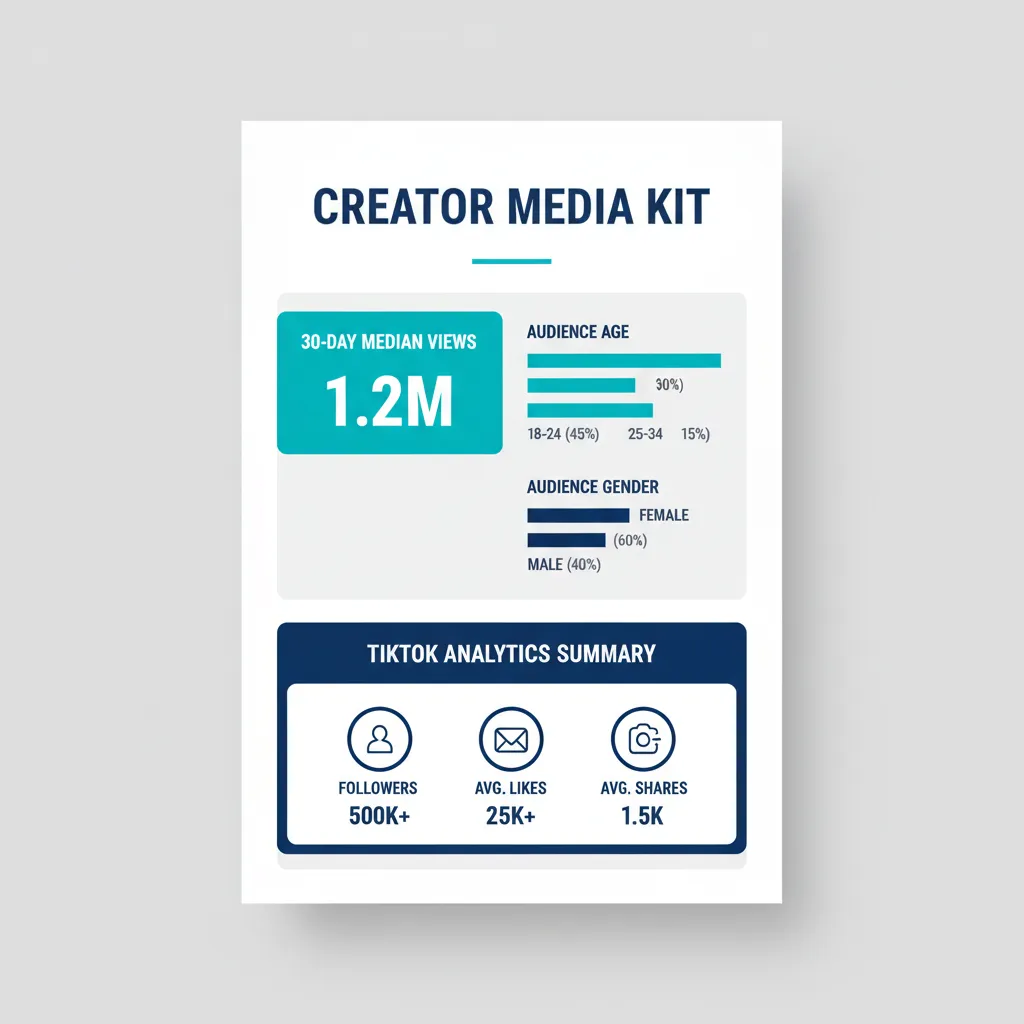
Don't just write numbers on a page; back them up with verified visual proof. Build a dedicated performance section inside your media kit that includes:
- Median View & Engagement Summary: Clear statistics showing 30-day median views, average ERv, and watch completion rates.
- Audience Demographics: Charts showing top country locations, gender distribution, and primary age brackets.
- Analytics Screenshots: Clean, cropped screenshots direct from TikTok Studio analytics validating your stats.
Presenting Tiered Rate Packages in Brand Pitches
Instead of offering a single video rate, present tiered packages. Packages encourage brands to increase their total spend by offering extra value across multiple deliverables.
- Tier 1 (Single Deliverable): 1x TikTok Organic Feed Video ($900)
- Tier 2 (Growth Bundle): 3x TikTok Organic Feed Videos + 30-Day Spark Ads Rights ($2,500 — Saves brand $200)
- Tier 3 (Full Campaign Bundle): 3x TikTok Videos + 60-Day Spark Ads Rights + 30-Day Exclusivity ($3,200)
Summary: Key Takeaways for Converting TikTok Metrics into Rates
Converting your TikTok metrics into a profitable media kit rate card boils down to a few core principles:
- Price on Median Reach: Base your standard posting fee on 30-day median views and CPM, never total follower counts.
- Unbundle Usage & Licensing: Always separate organic posting fees from paid usage rights, Spark Ads whitelisting, and exclusivity clauses.
- Update Metrics Monthly: Refresh your median views and analytics screenshots every 30 days to ensure your rate card accurately reflects current performance.
FAQ
How Often Should I Update the Metrics in My TikTok Media Kit?
Update your media kit every 30 days. Re-calculate your 30-day median views and update your analytics screenshots so brand partners always see your most current performance data.
What If My Median View Count Drops Temporarily?
If your median views dip, rely on bundled package deals or showcase high-performing specific content pillars that maintain strong engagement rates to defend your rates while rebuilding reach.