GVM Softbox Assembly: Identify the Model and Attach It to a P80s-Ii
GVM Softbox Assembly: Start by Checking the Model
GVM softboxes do not have one verified assembly procedure that can safely be assumed to fit every GVM light and softbox. The steps below cover attaching and removing a softbox on the GVM P80S-II, whose manual describes a Bowens-mount connection. They do not explain how to erect every softbox body or frame: use the instructions supplied for your specific softbox for that part.
Before assembling, read the model name on the light and the softbox packaging, label, or manual. Continue with the attachment steps below only if your light is a P80S-II and the softbox has a Bowens mount that matches it. The GVM P80S-II manual identifies a Bowens mount and a Bowens dismantling buckle; it says the softbox’s Bowens mount is inserted into the light’s mount and turned clockwise. (manualslib.com)
Attach a Bowens-Mount Softbox to the GVM P80s-Ii
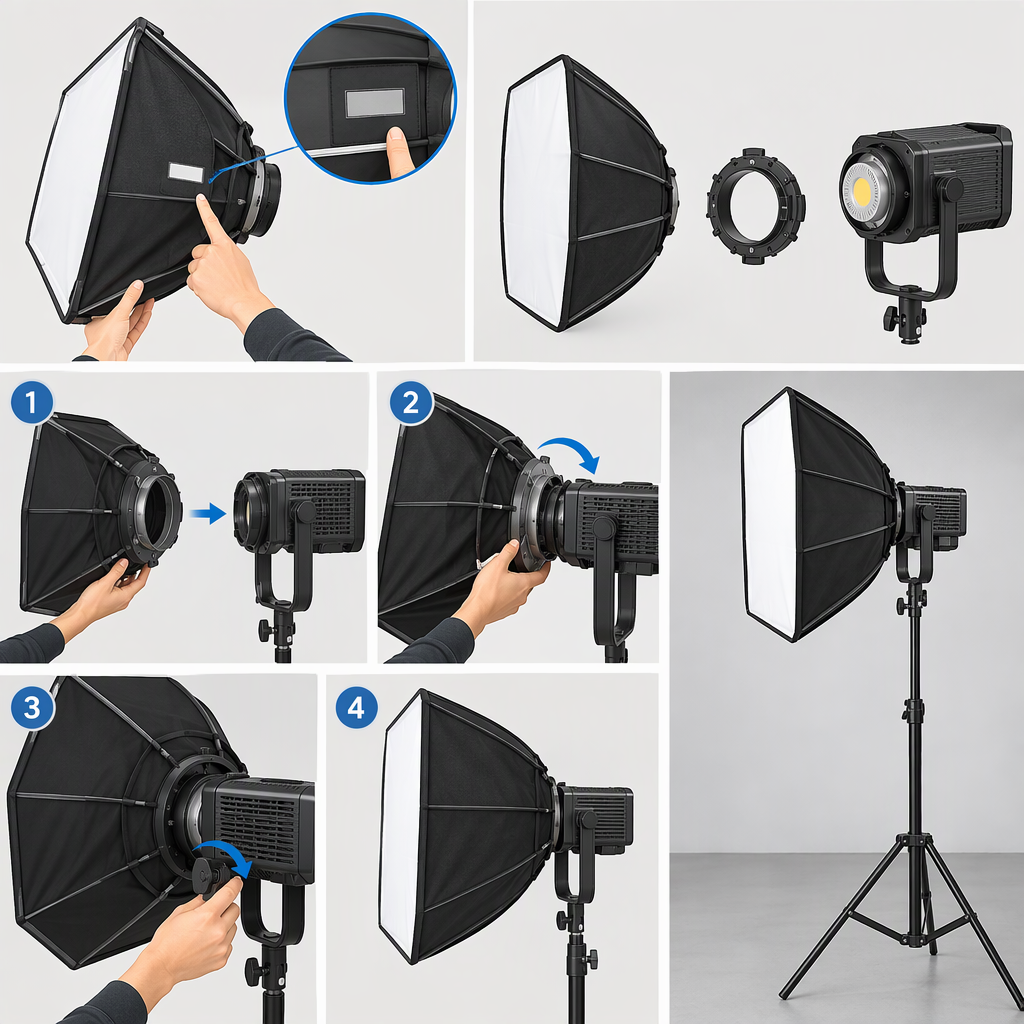
- Prepare the softbox according to its own instructions. Assemble its body and fit any diffuser, grid, or other included accessory in the order specified for that softbox. The P80S-II attachment directions start with the softbox’s Bowens mount already assembled; they do not document a universal frame or diffuser assembly sequence. (manualslib.com)
- Align the mounts. Bring the softbox’s assembled Bowens mount to the Bowens mount on the P80S-II.
- Insert and turn clockwise. Insert the softbox mount into the light mount, then turn the softbox clockwise, as directed in the P80S-II manual. (manualslib.com)
- Check before use. As a cautious general check—not a quoted GVM fit criterion—look to see that the ring appears seated and is not obviously loose. If it will not seat or turn normally, stop and check the instructions for both exact models rather than forcing the connection.
Remove the Softbox
The P80S-II manual says to push the Bowens dismantling buckle back while rotating the softbox counterclockwise. Support the softbox as you release it so it does not drop. (manualslib.com)
If These Steps Do Not Match Your Setup
- Different light model: Find that light’s manual before attaching the softbox. A GVM-branded light does not, by itself, establish that it uses the P80S-II mount or release method.
- Different softbox design: Follow the softbox’s own assembly guide for its body, supports, and accessories. GVM has published an installation video titled for the P80S, SD80D, SD200D, and SD300D, but its listing alone does not establish that every softbox design or later model uses the same body-assembly steps. (youtube.com)
- Parts do not fit or the mount feels unstable: Stop. Recheck the exact model names and mount instructions; do not force the parts or treat an uncertain connection as secure. The available P80S-II manual excerpt gives attachment and removal directions, but not a detailed troubleshooting checklist for mismatched parts.
In short: for the GVM P80S-II, insert the assembled Bowens mount into the light’s Bowens mount and turn clockwise. For the softbox’s frame and accessories—or any other GVM model—use the instructions for that specific softbox and light rather than assuming the P80S-II procedure applies.