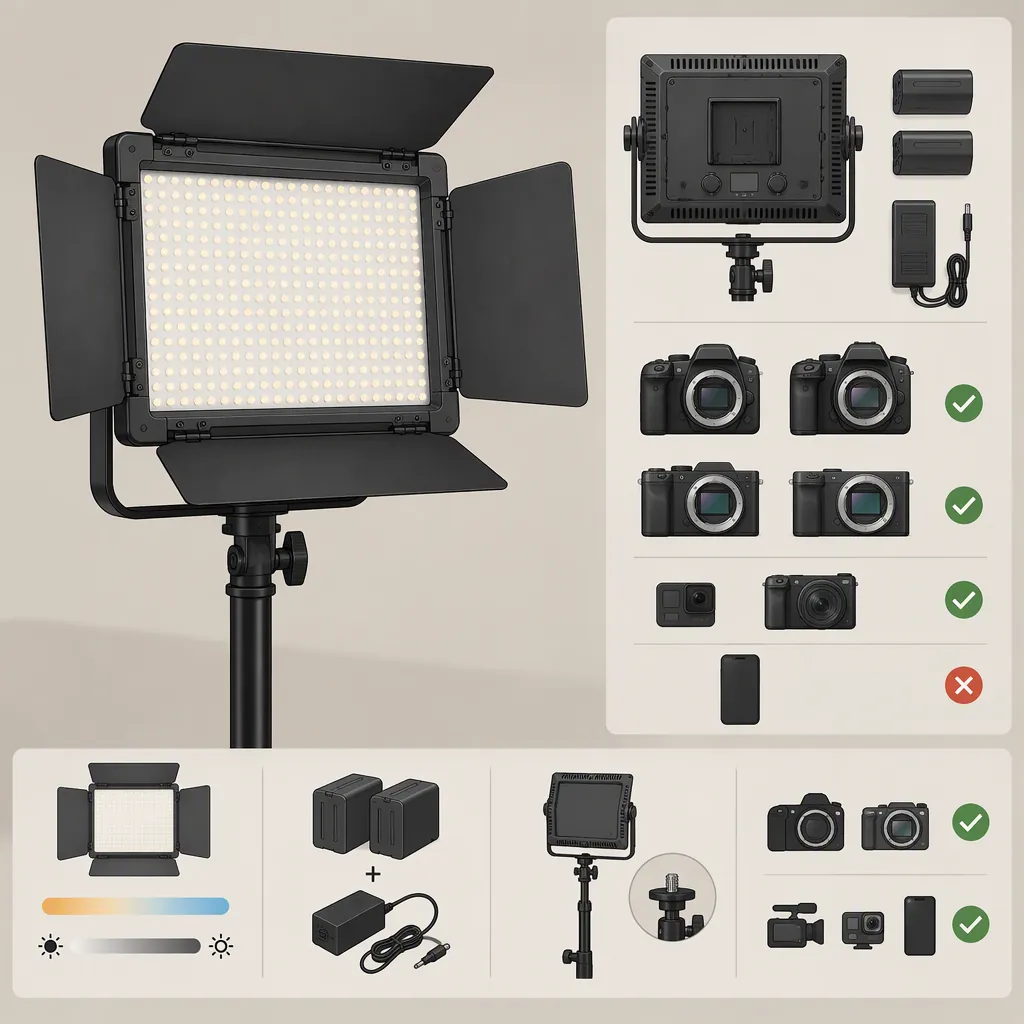
Yongnuo Yn600l Selection and Compatibility for Filming
For a Yongnuo YN600L, start with the exact model label and color-temperature version, then verify power, mounting, and control compatibility against that unit’s documentation. The supplied reference is a review titled YN600L II, but its body also uses YN600L and YN600; it should not be treated as a compatibility specification for every similarly named light. Decide whether a unit suits your filming setup through a camera and audio test, not the model name alone. [src_1]
Identify the Exact Unit Before Comparing Features
Treat the search phrase “yongnuo digital yn600l” as a starting point, not a complete equipment specification. Record the model designation printed on the light, its stated color-temperature range, and any version information in its matching manual.
The supplied 1KIND Photography review describes the YN600L II as an updated YN600L. It discusses a variable 3200–5500K option and a fixed 5500K option, and identifies the reviewed unit as the fixed-temperature version. Because the article shifts between YN600L II, YN600L, and YN600 naming, those descriptions do not establish which features belong to every version. [src_1]
For selection, write down whether your intended scene calls for a fixed color setting or adjustable color temperature. Then confirm that the actual unit supports the setting you need. Do not infer adjustable color temperature from a brightness display or the word “digital.”
Check Power and Mounting Separately
The review reports Sony NP-F-series battery use and a 12V/5A external power option for the light it describes. It also shows two battery positions and describes a bottom screw mount with an included handle that can be used with a light stand. These are review observations, not blanket approval for a particular battery, adapter, or stand. [src_1]
Before connecting an external supply, verify the exact unit’s required voltage, current capacity, connector dimensions, and polarity using its label and matching documentation. A plug that physically fits is not sufficient evidence of electrical compatibility. If those details cannot be confirmed, leave that power combination unverified rather than trying it.
For mounting, check the actual attachment interface, the stand’s documented load rating, and the complete assembled load, including any modifier. Plan cable routing and stand placement before testing. Keep any ventilation openings unobstructed, and use the equipment’s documented mounting procedure.
Unit Compatibility Record
- Exact model and version: __________
- Matching manual or label information: __________
- Color-temperature version: __________
- Required external supply voltage and current capacity: __________
- Connector dimensions and polarity: __________
- Documented battery compatibility: __________
- Mounting interface and stand load rating: __________
- Unresolved items—do not assume compatibility: __________
Verify Controls and Accessories on the Actual Light
The review describes coarse and fine brightness adjustment, a remote controller, channel selection, and mobile-control features. It also reports filter panels and barn doors on the reviewed light. The supplied source does not establish present-day app availability, current phone operating-system compatibility, or interoperability with other Yongnuo lights. [src_1]
If remote operation matters, check the controller’s exact model and test the functions required for the scene. Verify brightness adjustment, power switching, and color-temperature adjustment separately where applicable. For multiple lights, check both individual selection and group operation rather than assuming that matching channel numbers guarantee interoperability.
Treat accessories as another compatibility check. Confirm physical fit and any documented restrictions for a filter, bracket, or modifier. Do not use the review’s accessory list as proof of what is included with a different unit.
Use a Scene Test to Decide Suitability
The supplied review includes claims about avoiding flicker and improving brightness, but it does not provide a camera-setting test matrix or standardized output measurements in the supplied text. Do not turn those statements into a guarantee for your camera, exposure settings, or working distance. [src_1]
Instead, test the intended scene with the actual camera, microphone, power source, and light position. Evaluate the recorded result before assigning the light as a main light, fill light, or background light. Keep any conclusion specific to the setup tested.
Pre-Filming Acceptance Test
1. Confirm power and mounting details before switching on the light.
2. Place the light at the intended working distance and angle, with the planned modifier if compatible.
3. Record at each frame rate, shutter setting, and brightness level you expect to use.
4. Review the footage for visible bands, flicker, unwanted reflections, skin-tone appearance, and adequate exposure.
5. Record a quiet audio sample with the microphone in its intended position; listen for equipment noise.
6. Repeat with the intended remote-control workflow, if needed.
7. Log the settings that passed and any unresolved limitations. Do not generalize the result to untested settings.
FAQ
Are Yn600l and Yn600l Ii Specifications Interchangeable?
Do not assume they are. The review describes the II as an updated version, but also uses shorter model names throughout its body. Confirm each needed feature against the exact unit’s label and matching documentation. [src_1]
Does the Review Verify Which Power Adapter to Use?
It reports a 12V/5A power option, but the supplied text does not establish connector dimensions or polarity. That information alone is insufficient to approve an adapter for a particular unit. Verify all electrical and connector requirements before use. [src_1]
Is the Yn600l Suitable as a Main Light?
The supplied review cannot settle that for your scene: it does not provide standardized output measurements for your distance, modifier, or exposure. Test the exact unit in the intended setup and assess the recorded image and audio before assigning it that role. [src_1]