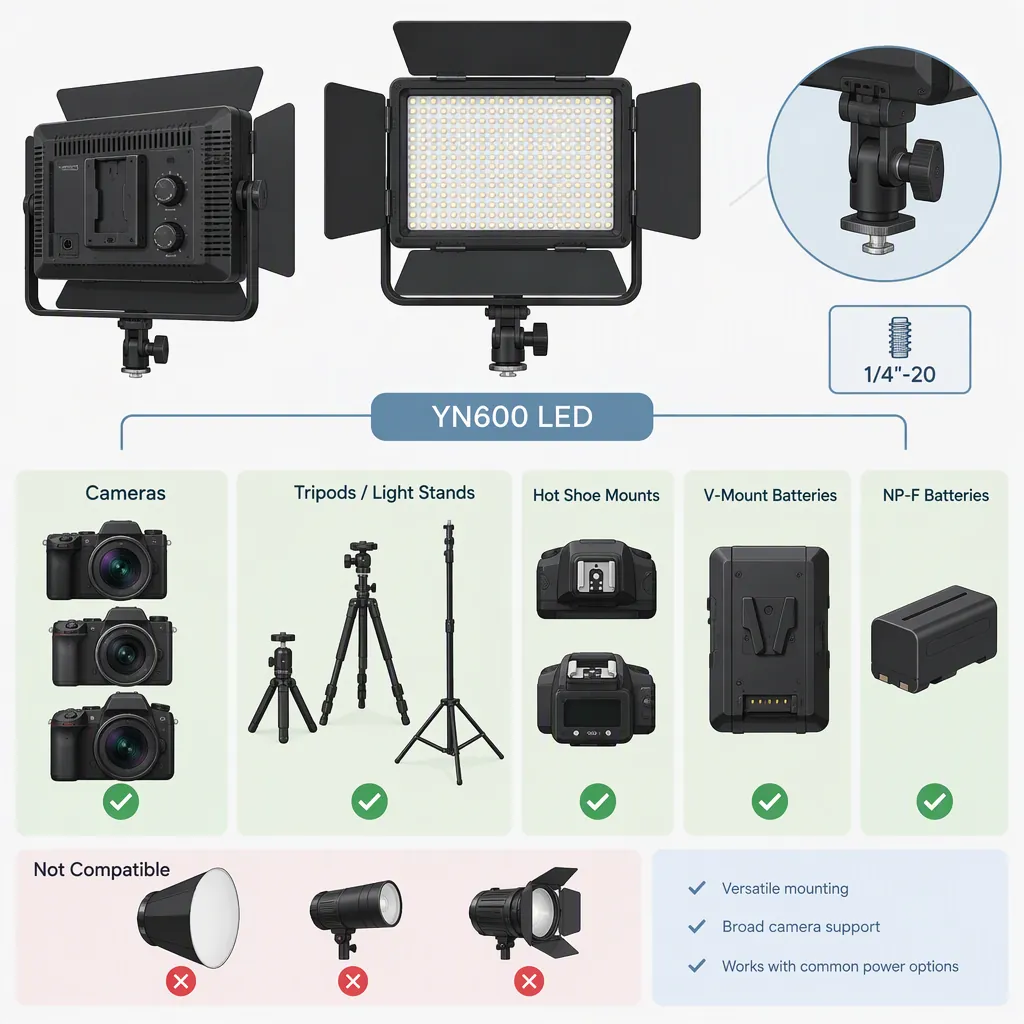
Yongnuo Yn600 Led Lights: Model Selection and Compatibility
For a search such as “led yongnuo yn600,” first identify the exact model and color-temperature version. The provided sources distinguish YN600 Air from YN600L and list both daylight and bi-color options. Do not assume their accessories, controls, or mounting arrangements are interchangeable. Confirm the unit label, model-specific manual, power requirements, and physical connections before planning a setup. These sources are product listings, not independent compatibility tests. [c1] [c2]
Identify the Model Before Comparing Listings
Treat “YN600” as an incomplete identification, not a sufficient accessory specification. The supplied YONGNUO pages name two separate models: YN600 Air and YN600L. Both pages offer a White 5600K option and a Bi-Color 3200K–5600K option. The supplied Amazon listing is specifically titled YN600L Pro with 5600K color temperature. [c1] [c2] [c3]
Record the full model name and selected version from the actual unit or its documentation. Keep the model, color-temperature version, and package contents separate: a bundle description does not establish what every unit includes.
The listings also contain inconsistencies. For example, the Air page's introductory text uses 3200K–5500K, while its option selector and specification table use 3200K–5600K. The Amazon YN600L listing gives different color-rendering figures in different parts of the page. These differences are reasons to seek model-specific documentation, not to silently choose the more favorable figure. [c1] [c3]
Verify Power Compatibility Separately
The YN600L page lists two NP-F batteries or an external 12V, 5A DC supply and states that batteries and the adapter are not included in the basic configuration. The Air page also describes battery and external-power operation, but its specification table lists 8V, 5A or 12V, 5A, whereas other text on the same page specifies 12V, 5A. Do not interpret that discrepancy as permission to try either voltage. [c1] [c2]
Use the exact unit's label and manual as a verification step. Before connecting external power, confirm:
- The required DC output voltage and current specification.
- Connector dimensions and polarity.
- The adapter's AC input requirements for the location.
- The precise supported battery models and required number of batteries.
The supplied listings do not establish the connector dimensions or polarity needed to validate an arbitrary replacement adapter. A matching plug shape or an “NP-F compatible” description alone should not be treated as a completed compatibility check. Leave uncertain power combinations unconnected.
Check Mounting and Controls Without Brand Assumptions
The YN600L listing names several camera brands and describes an infrared remote controller. The Air page lists a handle in its package contents. Neither description is enough to validate a particular camera shoe, stand adapter, modifier, or cross-model remote combination. [c1] [c2]
Separate three questions when checking a setup:
- Physical support: Does the actual attachment fit, and can the support safely carry the complete assembly?
- Light control: Does the exact remote or controller support this model and revision?
- Recording suitability: Does the light produce an acceptable result with the intended camera settings and placement?
Do not transfer the YN600L's listed infrared-control feature to the Air based on the shared “YN600” name. Likewise, navigation labels such as “APP” on a product page do not establish app support for that specific light. The supplied material does not provide a verified cross-model control or accessory compatibility matrix. [c1] [c2]
Use a Setup Checklist Before Filming
Use the listed daylight and bi-color options as a starting point for identifying controls, not as proof of color accuracy or sufficient illumination for a scene. The provided pages are manufacturer and marketplace descriptions; they do not supply independent testing for the intended camera, subject distance, modifiers, or recording settings. [c1] [c2] [c3]
For selection, define the actual requirements first: placement, support, available power, needed color-temperature adjustment, and whether sound will be recorded nearby. The YN600L page describes fan cooling, so include operating noise in a dialogue-recording check rather than assuming it will be inaudible. [c2]
After power and support have been verified, make a short test recording with the intended settings. Review the footage for exposure, color, and visible banding, and listen to the recorded audio. This is a proposed acceptance procedure, not a report of tested performance.
Model and Setup Verification Record
- [ ] Full model and revision recorded.
- [ ] Daylight or bi-color version confirmed.
- [ ] Unit label and matching manual checked.
- [ ] Battery or adapter requirements confirmed, including connector and polarity.
- [ ] Included accessories inventoried.
- [ ] Mounting interface and support capacity verified.
- [ ] Controller compatibility confirmed, if required.
- [ ] Intended camera settings and light placement recorded.
- [ ] Test footage reviewed for exposure, color, and banding.
- [ ] Test audio reviewed for equipment noise.
- [ ] Unresolved compatibility questions documented before filming.
FAQ
Are Yn600 Air and Yn600l the Same Model?
No. The supplied YONGNUO pages identify them separately. Use the full model name and version when checking manuals, power supplies, controls, and accessories; do not assume interchangeability from the shared YN600 name. [c1] [c2]
Does Every Yn600 Listing Describe a Bi-Color Light?
No. The YONGNUO pages offer White 5600K and Bi-Color 3200K–5600K options, while the supplied Amazon listing is titled as a 5600K YN600L Pro. Confirm the selected version rather than relying on a generic YN600 description. [c1] [c2] [c3]
Can Any 12V Adapter Be Used?
Do not assume so. The YN600L page lists a 12V, 5A DC supply, but the provided references do not establish the connector dimensions and polarity needed to validate an arbitrary adapter. The Air page also contains conflicting voltage information. Resolve the requirements using the exact unit's label and manual before connecting power. [c1] [c2]
Do the Listings Establish Flicker-Free Recording?
They include claims about avoiding stroboscopic effects, but no independent camera-specific test results are provided. Those descriptions do not establish performance at every frame rate, shutter setting, or dimming level. Include a test recording in the setup check. [c1] [c2] [c3]