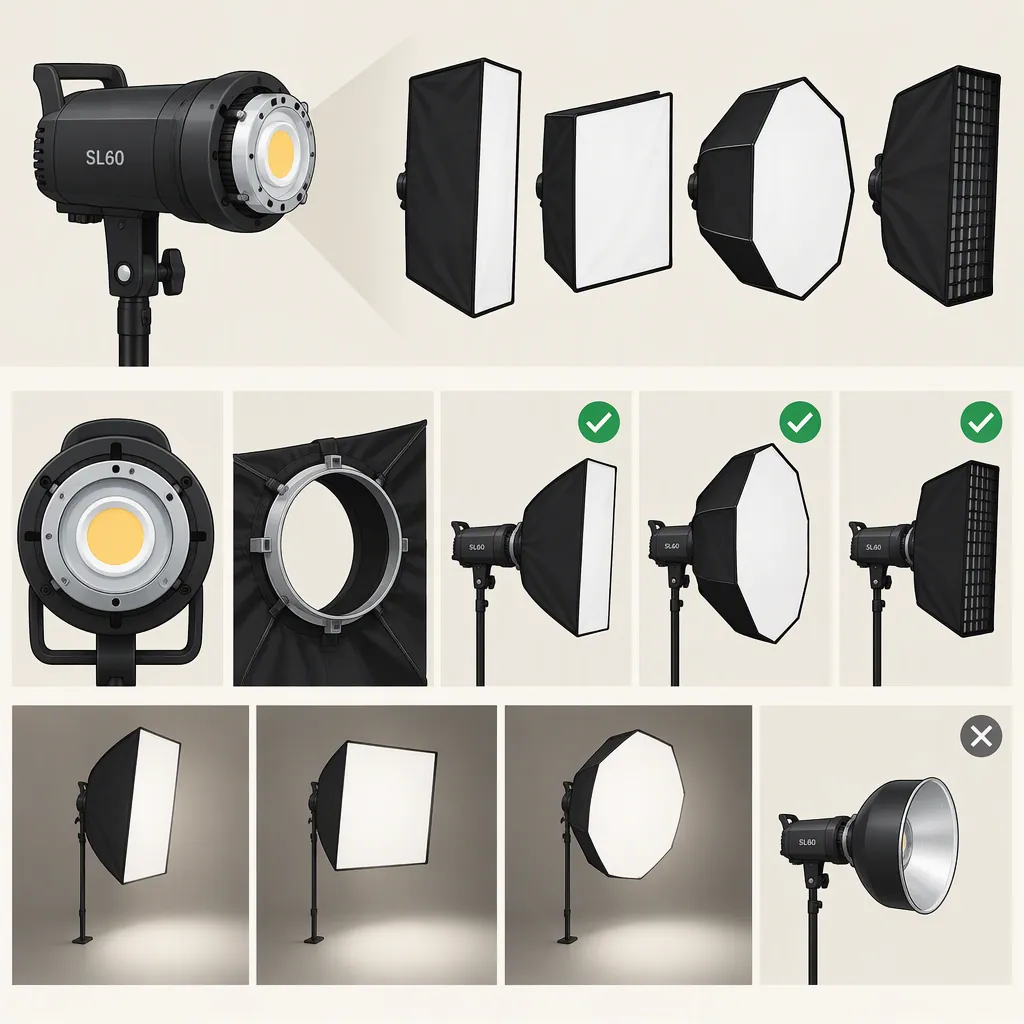
Godox SL60 Softbox Compatibility and Setup Checks
For a Godox SL60 softbox setup, start with Bowens-mount options: Godox’s SL60 page lists Bowens-mount softboxes among its optional accessories. That supports the accessory category, not a guarantee that every third-party softbox fits or can be safely supported. Confirm the exact light model, softbox mounting ring, clearance, and support requirements before assembly. [c1]
What the SL60 Accessory List Establishes
Godox’s SL60 product page lists QR-P70/P90/P120 parabolic softboxes and CS-50D, CS-65D, and CS-85D Bowens-mount softboxes under optional accessories. This is the strongest supplied evidence for choosing a mounting category. [c1]
Treat compatibility as two separate questions:
- Attachment: Does the softbox’s mounting ring match the exact light’s accessory interface?
- Support: Can the assembled light, modifier, and stand remain secure at the intended height and angle?
The supplied manufacturer text does not provide a modifier weight limit, detailed clearance measurements, or universal third-party compatibility. Do not interpret a matching mount label as approval for every size or weight.
Check the model label rather than relying only on a search term such as “godox sl 60 softbox.” The comparison reference discusses both SL60W and UL60 equipment; its UL60 mounting and support observations should not be transferred automatically to an SL60 setup. [c2]
Compatibility Record
Complete before assembly:
- Exact light model: __________
- Softbox model: __________
- Mounting ring type: __________
- Manufacturer compatibility confirmation: __________
- Modifier weight and support requirements: __________
- Stand load rating and setup guidance: __________
- Unresolved fit or clearance questions: __________

If an essential detail is unresolved, leave the setup unassembled until it is confirmed.
Choose Size and Diffusion for the Shot
Use framing, working distance, available space, and desired background spill to guide the size decision—not the mount alone.
Keith Knittel’s comparison describes tests of 70 cm and 120 cm softboxes on a UL60. In those tests, the larger modifier spread light more broadly, while the smaller modifier with a grid limited background spill. The author also reported reduced intensity with the grid fitted. These are observations from that setup, not measured SL60 performance guarantees. [c2]
For your own setup, compare:
- Whether the modifier fits outside the camera frame at the intended distance.
- Whether it illuminates the required subject area.
- Whether background spill suits the scene.
- Whether exposure remains usable with the intended diffusion and grid.
- Whether the assembled modifier leaves room for safe movement.
The supplied references do not establish one ideal SL60 softbox size or a guaranteed exposure for a particular camera setting.
Check Support Separately from Mount Fit
A modifier attaching successfully is not enough to establish a safe complete setup. Follow the light, modifier, and stand manufacturers’ assembly and support instructions; do not force a mounting ring that does not seat correctly.
Before raising the stand, check that the modifier is assembled correctly, the locking mechanism is engaged, and the intended tilt does not create interference. Verify ventilation clearance against the light’s manual rather than guessing a safe gap. Godox’s SL60 page provides product-manual and LED safety-instruction download entries, although the supplied excerpt does not include their contents. [c1]
Knittel reports supporting a 120 cm softbox on a UL60 and emphasizes substantial stand support for that front-heavy arrangement. That report is not an SL60 load rating or permission to duplicate the setup with a different stand. [c2]
Test the Complete Filming Setup
Evaluate the assembled setup with the camera and microphone in their actual recording positions. Keep camera exposure and white balance fixed while comparing modifier configurations so that automatic adjustments do not obscure the differences.
Record a short clip with the intended diffusion and grid, then review subject exposure, shadows, background spill, and audio. Knittel reports audible SL60W fan noise when the light was too close to a microphone; the supplied sources do not provide a measured noise level or a universally safe microphone distance. [c2]
Treat this as a scene-specific check, not a claim that a particular softbox size will deliver enough light or solve recording noise.
Controlled Setup Test
1. Confirm assembly and support using the relevant equipment instructions.
2. Set the camera, subject, light, and microphone in their intended positions.
3. Fix exposure and white balance.
4. Record the intended softbox configuration.
5. Change only one variable, such as grid use or light position, and record again.
6. Compare exposure, shadow edges, background spill, and recorded noise.
7. Document the configuration that meets the scene’s requirements.
FAQ
Does the Godox SL60 Use Bowens-Mount Softboxes?
Godox’s SL60 page lists Bowens-mount softboxes as optional accessories. Use that as the starting category, then verify the exact light and modifier combination. The supplied text does not guarantee every third-party Bowens-mount softbox. [c1]
Can an SL60 Safely Hold a 120 Cm Softbox?
The supplied references do not establish an SL60 modifier load limit. Knittel’s report of supporting a 120 cm softbox concerns the UL60, so it is not sufficient evidence for an SL60 setup. Confirm the light’s support limits and the stand requirements independently. [c2]
Should I Use a Grid with the Softbox?
Test both configurations against your scene’s spill and exposure requirements. In Knittel’s UL60 comparison, a grid reduced background spill but also reduced intensity. That observation is useful for planning a test, not predicting exact SL60 output. [c2]