How to Make a Duet Video on TikTok
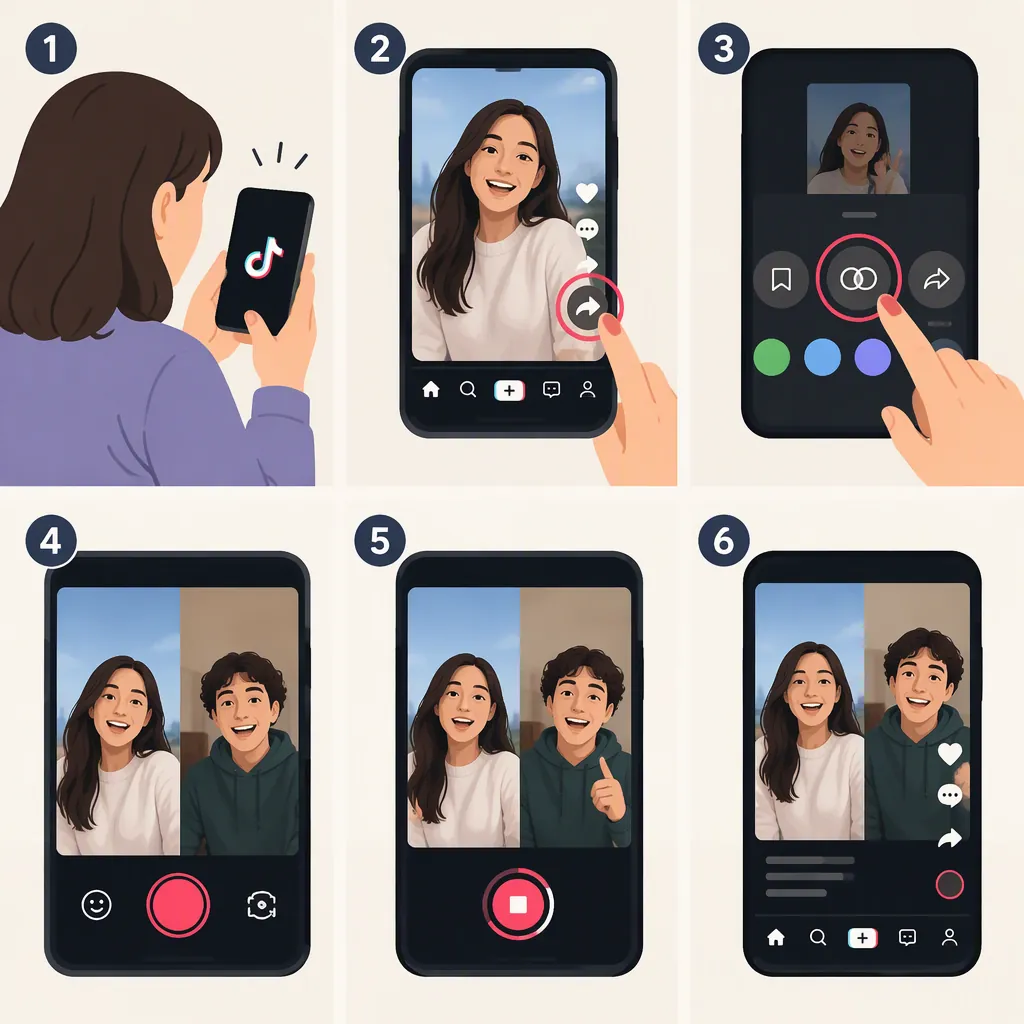
To make a duet video on TikTok, open a video with Duet enabled, tap Share, choose Duet, and record your part. Tap the check mark, review the result, then select Next, add a caption, and tap Post. Enable the microphone before recording if you want to capture your voice. These steps follow Linktree’s April 2023 tutorial; the current interface may differ. [c1]
Choose a Video and Plan Your Part
A TikTok Duet places your recording alongside another creator’s video. Linktree’s tutorial describes Duet as available for public videos with the Duet function enabled. Start by finding a video that offers that option. [c1]
Before recording, decide what your contribution will be: a reaction, spoken explanation, musical response, or coordinated movement. Watch the source video once without recording and note when you want to speak or move. This is a preparation suggestion, not a requirement of the feature.
The button names and recording sequence below come from a third-party tutorial published in April 2023, not current TikTok documentation. Use them as a starting point rather than a guarantee of today’s interface. [c1]
Pre-Recording Checklist
- Choose a video that offers Duet.
- Watch it through and identify your response cues.
- Decide whether you need live microphone audio.
- Prepare a short test take before recording the full response.
Record and Post Your Duet
Linktree gives the following recording sequence. Follow it where these controls are available in your app. [c1]
- Open TikTok and sign in. Find the video you want to respond to.
- Tap Share. The tutorial identifies this as the arrow icon on the right side of the video.
- Select Duet. This opens the duet recording flow.
- Tap the red recording button. Perform your response alongside the source video.
- Tap the check mark when finished. The tutorial also describes adding stickers or effects at this stage.
- Review before publishing. Check your timing, framing, and audio. Consider another take if your contribution is hard to follow.
- Tap Next. Add a caption that explains your response.
- Tap Post when ready to publish. [c1]
The review suggestions are an editorial checklist; they are not additional app requirements.
Add Your Voice or a Voiceover
For speech or singing captured during the take, Linktree instructs users to select the microphone icon after opening Duet, then start recording. Its tutorial recommends connecting headphones or earphones for this workflow. [c1]
For narration recorded afterward, the tutorial describes a separate route: record the duet first, choose Voiceover, tap or hold the red button to record your narration, preview it, and select Save. These are the labels described in the 2023 guide; their present availability is not established by the supplied references. [c1]
As a practical review step, listen to a short test before committing to a full take. Check whether your words are audible and whether your response lands at the intended moment. Headphones are also recommended in api.video’s separate browser-duet tutorial because the source video plays aloud; that tutorial is not a guide to TikTok’s controls. [c2]
If Duet Is Not Available
First check whether the selected video offers Duet in its Share options. The supplied TikTok tutorial limits its instructions to public videos with Duet enabled, so do not assume every video can be used. [c1]
If the option is missing, try another video that offers it. The supplied references do not establish every current reason Duet might be unavailable, so they cannot support a complete account, device, or app-version diagnosis.
If your controls differ from the sequence above, avoid treating the older labels as exact current instructions.
FAQ
What Is a Duet Video?
A TikTok Duet combines your recording with another creator’s video in a side-by-side presentation. It can be used for a reaction, commentary, or singing along. [c1]
How Do I Record a Duet with My Voice?
In the workflow described by Linktree, open Share, select Duet, enable the microphone icon, and record. The guide also describes adding narration afterward through Voiceover. Because the guide dates from April 2023, the current controls may differ. [c1]
Can I Use a Prerecorded Video for a TikTok Duet?
Linktree’s April 2023 tutorial says TikTok’s Duet workflow does not accept a prerecorded video and instead uses the built-in camera. That is a dated limitation in the supplied source, not confirmation of TikTok’s current capabilities. [c1]