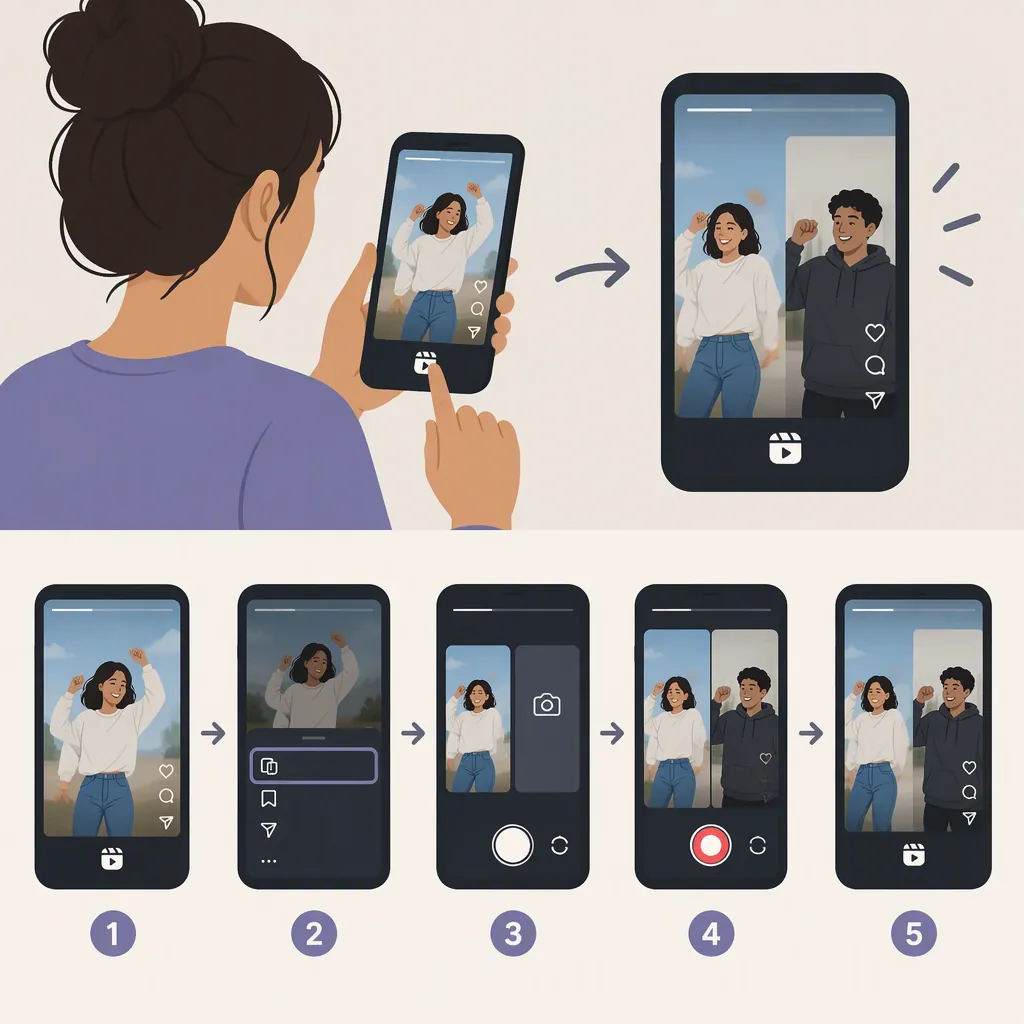
How to Duet Instagram Reels with Remix
To make a duet-style Instagram Reel, look for Remix: open the Reel’s three-dot menu, select “Remix this Reel,” and record or select your video alongside the original. This workflow is documented in April 2021 reporting; current menu labels and availability are not verified by the provided sources. [c2]
Duet-Style Reels Use Remix
For the side-by-side response format commonly called a duet, the Instagram feature to look for is Remix. Times of India’s April 3, 2021 report describes Remix as placing an existing Reel on one side and your new video on the other. It identifies reactions, responses, and adding another voice as possible uses. [c2]
This tutorial follows that documented workflow. Treat the button names and layout as a historical starting point, not a guarantee of the current Instagram interface.
How to Make a Duet-Style Reel
The documented Remix sequence is: [c2]
- Open the Reel you want to respond to. Choose a clip with a moment you want to react to or a part you want to accompany.
- Open its three-dot menu. Look for “Remix this Reel.” If the option is absent, see the next section rather than assuming every Reel can be remixed.
- Select the Remix option. The report describes a creation screen with the original Reel beside your new video, with your contribution on the right.
- Record or select your contribution. The documented workflow allows shooting a fresh video or selecting a video.
- Use the available editing controls. The report lists effects, a timer, and audio options. It does not document the current control names or locations.
Before sharing, review whether your response lines up with the intended moment and whether both parts are understandable. For a singing duet, listen for a clear entrance and a balance that lets both voices be heard. These are production suggestions, not verified descriptions of specific Instagram controls.
If the Remix Option Is Missing
The 2021 report says older Reels needed remixing enabled manually and that users could disable remixing. It describes an “Enable Remixing” option in a Reel’s three-dot menu. Those details explain why permission is worth checking, but they do not establish today’s defaults or settings paths. [c2]
If you are trying to remix someone else’s Reel, ask the creator to check whether remixing is enabled for that clip. If it is your own Reel, inspect its available menu options. You can also check another Reel to see whether the Remix option appears there.
If Remix still does not appear, the provided sources do not establish the cause. They do not verify current account restrictions, device differences, or a troubleshooting fix. Avoid treating the historical settings path as a guaranteed solution.
FAQ
Is Instagram’s Duet-Style Feature Called Remix?
Yes—the April 2021 report calls Instagram’s side-by-side Reel response feature “Remix for Reels” and compares it with TikTok Duet. Look for Remix rather than assuming the menu contains a button named Duet. [c2]
Do I Have to Record a New Video for a Remix?
The documented workflow allows either selecting a video or recording a fresh one. The supplied report does not verify the current placement or wording of those controls. [c2]
Can I Duet Every Instagram Reel?
Do not assume so. The 2021 report describes remixing permissions, including the ability to disable the feature and the need to enable it for older Reels. The provided sources do not establish current eligibility rules. [c2]