B-Roll in Films: Understanding, Shooting, and Editing
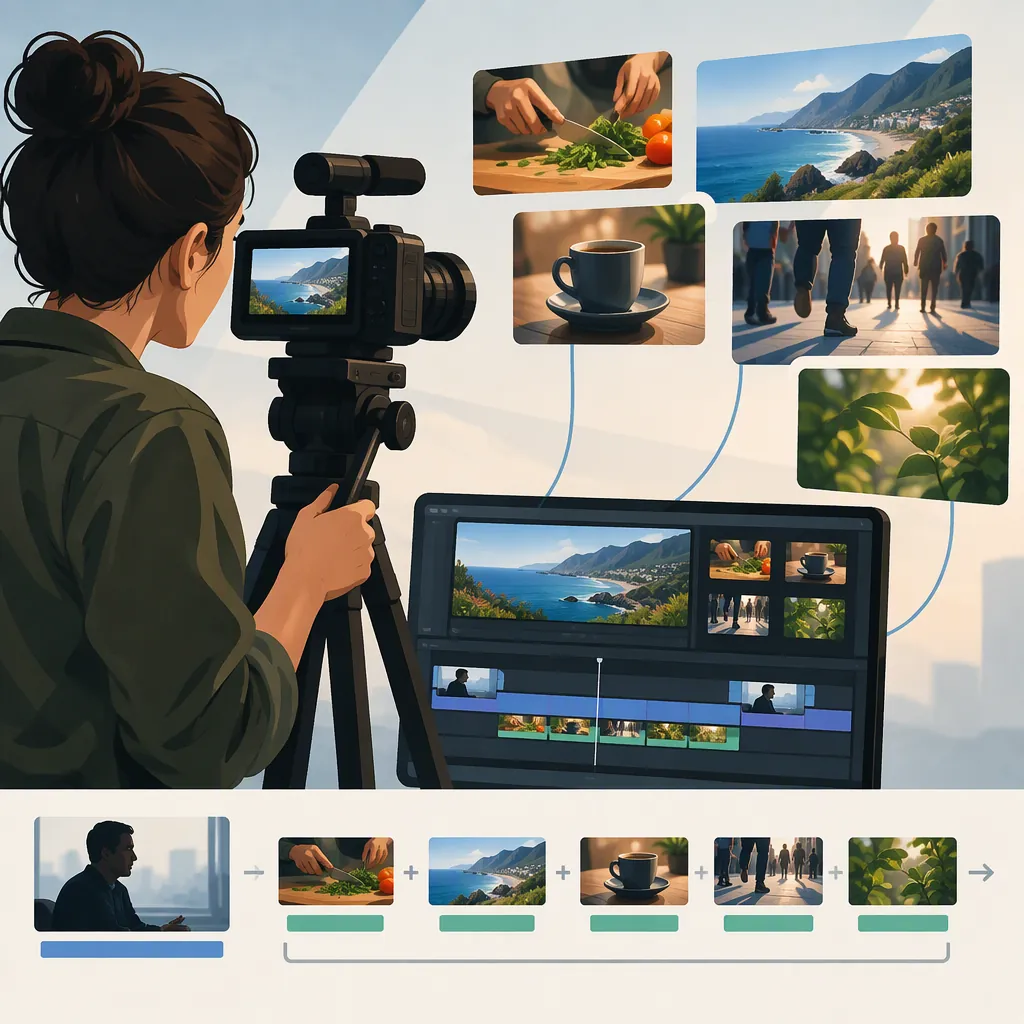
B-roll is supporting footage used alongside the primary footage, often called A-roll. In films, interviews, and documentary-style videos, it can establish a location, illustrate what someone is discussing, bridge scenes, or suggest passing time. Plan it around a specific story purpose rather than treating it as decorative filler. [c1]
What Is B-Roll in Films?
A-roll carries the main narrative or action; B-roll supplies supporting images that can be cut into that narrative. For example, an interview may provide the main account while shots of a workspace, tools, and relevant activity show its context. Noble Bison Productions describes B-roll as secondary, cutaway footage and identifies establishing shots, transitions, and related objects or actions among its uses. [c1]
The distinction is about a shot’s role in the edit, not simply what camera captured it. A useful planning question is: Does this image carry the main event, or support another part of the story? Avoid treating every visually appealing clip as necessary B-roll.
Give Each Shot a Story Purpose
The source describes several functions for B-roll: establishing a setting, connecting scenes, showing time passing, and depicting objects or actions related to the narrative. [c1] Use those functions as planning categories:
- Orient: Show the location before moving into a closer scene.
- Illustrate: Show the object or activity mentioned in the dialogue.
- Connect: Provide a relevant visual bridge between speakers or locations.
- Mark time: Show a change that the story genuinely intends to communicate.
For a hypothetical film about repairing a bicycle, the interview could explain the repair, while supporting shots show the workshop, the damaged component, and the repair activity. These are planning examples, not footage from a documented production.
Before adding a shot, finish this sentence: “The viewer needs this image to understand _____.” If the answer is only “it looks cinematic,” reconsider its place.
Story-To-Shot Planning Template
Story beat or dialogue: _____
What the viewer needs to understand: _____
Supporting image: _____
Purpose: orient / illustrate / connect / mark time
Required location, object, or activity: _____
Could this image imply something the story does not establish? _____
Shoot Coverage with the Edit in Mind
The reference discusses gathering additional angles and close-ups through pickup shots. [c1] As a practical approach, plan several complementary views of an important activity rather than collecting unrelated images.
For the hypothetical bicycle repair, try:
- A wider view that makes the work area understandable.
- A closer view of the person handling the bicycle.
- A detail of the component being discussed.
- A view of the resulting condition, if the story calls for it.
During capture, let an action unfold rather than stopping as soon as it starts. Leave some stillness before and after the action so you have choices when cutting. Check focus, brightness, and distracting background elements before moving on.
If you intend shots to represent one continuous activity, watch for changes in object positions or the stage of the work. If you ask someone to repeat an action, consider whether the finished sequence could misleadingly present that repetition as spontaneous or uninterrupted.
These are suggested shooting practices, not fixed camera settings. The supplied reference does not establish a universal clip duration, frame rate, or lens choice.
On-Location B-Roll Checklist
- Identify the story beat this shot supports.
- Capture context, activity, and a relevant detail.
- Check focus, brightness, and the background.
- Allow the action to begin and finish.
- Leave usable footage before and after the action.
- Note any repeated or staged activity.
- Review whether the essential supporting images are missing.
Edit B-Roll Without Changing the Meaning
B-roll can provide a transition between primary scenes or illustrate an interview while the speaker’s account continues. [c1] A useful editing sequence is to establish the main story first, then add supporting images where they clarify it.
- Match the image to the thought. Place a detail where the narration actually discusses it.
- Check implied connections. Do not let footage of an unrelated place or person appear to verify a specific account.
- Preserve useful context. Return to the main scene when the viewer needs to see the speaker or central action.
- Judge duration by comprehension. Let viewers understand the image, then move on when its purpose is complete.
- Review the sequence without sound. Ask what relationships the pictures alone seem to claim.
A smoother transition is not a reason to distort chronology or conceal a change in meaning. Treat the visual sequence as part of the account, not just a layer of decoration.
Use Stock and Drone Footage Selectively
Noble Bison Productions lists stock footage and drone footage as possible sources of supporting imagery, particularly for context and establishing locations. [c1] Neither is a required ingredient.
For stock footage, check the specific license before use and consider whether the image could be mistaken for the actual location, event, or subject in your story. For aerial footage, start with the narrative need: does the wider perspective explain geography or a relationship that a ground-level shot would not?
The supplied source is a production-company explainer, not a rights-clearance or flight-compliance guide. It does not establish permission to use any particular clip or operate a drone in a particular place.
FAQ
What Is the Difference Between A-Roll and B-Roll?
A-roll is the primary footage carrying the narrative or main action. B-roll is supporting footage used as cutaways or related imagery. An interview paired with images of the activity being discussed is a common example. [c1]
What Are Examples of B-Roll in Films?
Examples include an exterior that establishes a scene’s location, a close-up of a relevant object, supporting activity shown during an interview, or images that communicate passing time. Their purpose is to support the surrounding narrative. [c1]
How Much B-Roll Should I Shoot?
The supplied reference gives no universal quantity or ratio. Plan enough supporting images to cover the story’s essential locations, objects, actions, and transitions. Use a shot list tied to those needs rather than aiming for an arbitrary footage total.
Do I Need a Drone to Shoot B-Roll?
No. The source describes drone footage as one option alongside related objects, subjects, actions, and other supporting imagery. Choose aerial footage only when that perspective serves the story. [c1]