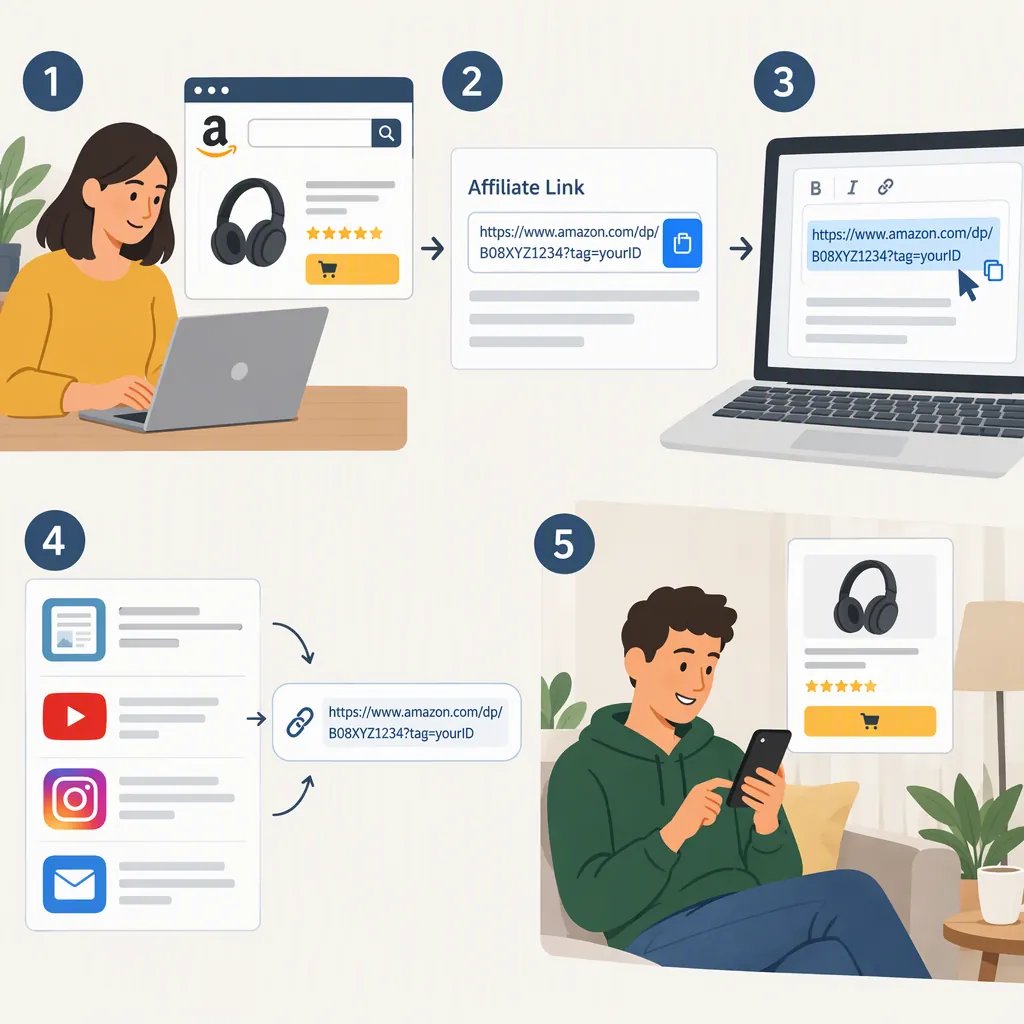
How to Create and Use an Amazon Affiliate Link
An Amazon affiliate link is an Amazon URL with tracking information that identifies an Amazon Associate’s referral. To create one, set up an Associates account for the relevant storefront, select your tracking ID, and use the link-building options available in your account. Before publishing, check the destination, disclose potential earnings, and verify that the placement follows current program rules. A link does not guarantee commission; qualifying activity and program terms determine earnings. [c1]
Understand What the Link Tracks
A regular product URL points to an Amazon listing. An affiliate version adds information that associates the referral with an account. The supplied guide illustrates this using the tag query parameter; its Amazon.com example has a tracking ID ending in -20. [c1]
Treat the tracking ID as an account-specific identifier, not a label to copy from someone else’s example. A URL’s appearance alone is not proof that a purchase will qualify for earnings.
Evidence limitation: The detailed reference is a third-party guide, not Amazon’s current Operating Agreement. Its descriptions of tools, attribution windows, and restrictions may be dated. Amazon’s supplied Creator University page provides navigation to affiliate-link education, reporting, and program policies, but the supplied text does not include those detailed rules. [c1] [c2]
Prepare Your Account and Publishing Locations
Before building links, identify the Amazon storefront relevant to your audience and the website or social channel where the links will appear. The guide describes storefront-specific Associates programs and advises keeping the account’s list of publishing locations current. For a social channel, it recommends supplying the full channel URL rather than only the platform’s homepage. [c1]
Do not assume that an Amazon.com tracking ID covers purchases across every Amazon storefront. For an international audience, verify the applicable regional enrollment and link-routing requirements before publishing. The guide describes regional programs and localization, but its country counts and tool coverage should not be treated as current. [c1]
Account Preparation Worksheet
- Intended Amazon storefront: enter the relevant store.
- Publishing location: record the full website or channel URL.
- Account status: verify current eligibility in Associates Central.
- Tracking ID: record the identifier selected for this placement.
- Policy review: record the date you checked current placement and disclosure requirements.
Create and Review the Link
Use this workflow without relying on a particular button name or interface layout:
- Identify the intended product and storefront.
- Open the link-building options available through your Associates account or its current guidance.
- Select the tracking ID intended for that publishing location.
- Generate and copy the affiliate URL.
- Review the destination and tracking information before adding it to your content.
The guide describes tracking IDs as the identifiers used in affiliate links and explains that separate IDs can help distinguish performance across publishing properties. Amazon’s Creator University also provides entry points for link-sharing education and reports. Neither supplied reference documents a complete current link-builder interface, so exact clicks are not specified here. [c1] [c2]
Prefer the account’s supported generation method over manually guessing a tag or copying another publisher’s URL.
Publish with Clear Disclosure
Make the financial relationship understandable near the recommendation or link. The guide distinguishes a reader-facing disclosure about potential earnings from the Amazon Associate identification statement. It reproduces the statement: “As an Amazon Associate I earn from qualifying purchases.” [c1]
A plain-language draft for a nearby disclosure is: “I may earn a commission from qualifying purchases made through links in this article.” This is an example to evaluate for your actual placement—not a guarantee of legal or program compliance.
Use descriptive link text that makes the Amazon destination clear. Avoid hiding the affiliate relationship or making unsupported price and availability claims. The guide discusses restrictions involving disclosures, shortened links, product data, email, offline materials, social placements, and paid ads. Verify the current rules for your intended format rather than treating that guide as permission. [c1]
Prepublication Checklist
- Confirm the product and storefront match the surrounding text.
- Confirm the intended tracking ID was selected.
- Make the Amazon destination clear to readers.
- Place an understandable earnings disclosure near the relevant content.
- Check current Amazon identification and placement requirements.
- Remove unsupported prices, availability statements, ratings, and earnings promises.
- Record the published location for later review.
Maintain Links and Interpret Reports
Keep a simple inventory of published links, intended destinations, and tracking IDs. The guide notes that product links can become broken or lead to unavailable items, and that reports can be filtered by tracking ID to compare publishing properties. [c1]
If reported earnings are missing, review the account, selected ID, storefront, and applicable qualification rules. Do not assume that every click produces a commission or that absent earnings necessarily mean the URL is broken. The guide describes attribution and timing conditions, but this article does not treat its specific windows as verified current terms. [c1]
Use current account guidance for link validation. Avoid repeated self-clicks or purchases as a commission test; the guide flags self-clicking during link checks as a compliance concern. [c1]
FAQ
Is a Regular Amazon Product Url an Affiliate Link?
Not necessarily. The guide distinguishes a regular product URL from an affiliate version by the addition of tracking information, illustrated with the tag parameter. Use your account’s supported link-generation method rather than assuming any copied Amazon URL identifies your referral. [c1]
Can I Put an Amazon Affiliate Link on Social Media?
The guide describes social-channel use, with requirements concerning listed publishing locations, disclosures, account control, and public accessibility. That is not blanket permission for every platform or placement. Check the current Amazon rules and the platform’s rules before publishing. [c1]
Will One Amazon Affiliate Link Work for Every Country?
Do not assume it will. The guide describes storefront-specific programs and explains that regional enrollment alone does not automatically localize existing links. Verify current storefront coverage, tracking, and destination behavior for any international setup. [c1]